
Did your Dell laptop charger stop working, display a flashing light, or suffer physical cable breakage? Replacing a Dell power adapter is far more technical than buying a generic plug. Because modern Dell laptops use a proprietary 1-wire data communication system between the adapter's internal identification chip and your motherboard, selecting the wrong wattage or pin diameter can cause severe throttling, "Plugged in, not charging" errors, or permanently fry your motherboard power management circuitry.
In this definitive hardware guide, our senior electronics engineers at Zitek break down exact Dell charger wattages (45W, 65W, 90W, 130W), barrel pin dimensions (4.5mm Small Pin vs 7.4mm Big Pin vs USB-C GaN), 2026 replacement costs in Ahmedabad, and how to verify 100% genuine OEM hardware.
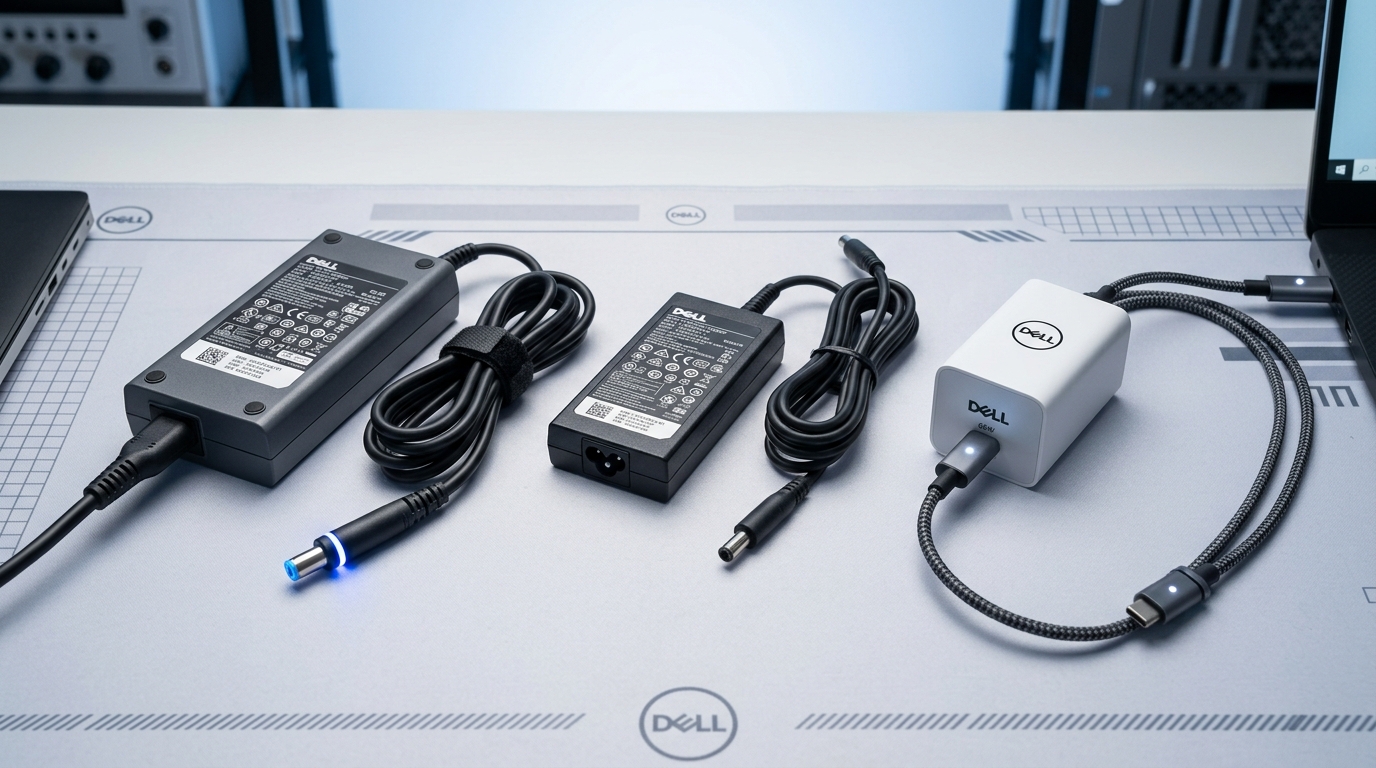 Genuine original Dell 65W barrel charger with illuminated blue LED tip, 45W slim adapter, and Dell 65W Type-C GaN charger available at Zitek Techcare Ahmedabad.
Direct Answer: What is the Price of an Original Dell Laptop Charger in Ahmedabad?
Quick Answer (AEO Snippet):
An authentic, 100% original Dell laptop charger in Ahmedabad costs between ₹850 and ₹4,200, depending on output wattage and connector type:
- Dell 45W (19.5V, 2.31A Small Pin 4.5mm): ₹850 - ₹1,450
- Dell 65W (19.5V, 3.34A Small Pin / Big Pin): ₹1,150 - ₹1,850
- Dell 65W Type-C (USB-C Power Delivery GaN): ₹1,850 - ₹2,600
- Dell 90W (19.5V, 4.62A Barrel Pin): ₹1,650 - ₹2,400
- Dell 130W / 180W / 240W (XPS, Precision, G15 Gaming): ₹2,800 - ₹4,500
All original chargers supplied by Zitek include the heavy-duty 3-pin power cord, same-day 60-minute doorstep delivery in Ahmedabad & Gandhinagar, on-site voltage testing, and an official 1-year replacement warranty.
The Ultimate Dell Charger Wattage & Voltage Breakdown
Every Dell laptop has a specific power intake profile indicated on the underside label (e.g., INPUT: 19.5V ⎓ 3.34A). Using an underpowered charger forces your CPU to throttle to 0.79 GHz, while a cheap unbranded charger delivers high electrical ripple that ruins the battery.
┌─────────┬──────────────┬──────────────┬─────────────────────────────────────────────────┐
│ Wattage │ Output Spec  │ Pin Type     │ Typical Compatible Dell Models                  │
├─────────┼──────────────┼──────────────┼─────────────────────────────────────────────────┤
│ **45W** │ 19.5V 2.31A  │ 4.5mm Small  │ Inspiron 3501, 3511, 3520, Latitude 3410, 3420 │
│ **65W** │ 19.5V 3.34A  │ 4.5mm Small  │ Inspiron 5570, 5590, 5502, Latitude 5480, 5490 │
│ **65W** │ 19.5V 3.34A  │ 7.4mm Big    │ Inspiron N5010, N5110, Latitude E7470, E5470    │
│ **65W** │ 20V 3.25A    │ USB Type-C   │ Latitude 5420, 7420, XPS 13 9360, 9370, 9310    │
│ **90W** │ 19.5V 4.62A  │ 4.5mm / 7.4mm│ Latitude 5580, Vostro 7590, Inspiron 7570      │
│ **130W**│ 19.5V / 20V  │ 4.5mm / TypeC│ XPS 15 9570, 9500, Precision 5520, 5530, 5540   │
│ **180W**│ 19.5V 9.23A  │ 7.4mm Barrel │ Dell G15 5510, 5515, G3 3590, G5 5590 Gaming    │
│ **240W**│ 19.5V 12.3A  │ 7.4mm Barrel │ Dell Alienware m15, m17, Precision 7550, 7750   │
└─────────┴──────────────┴──────────────┴─────────────────────────────────────────────────┘
Expert Engineering Rule: You can always use a higher-wattage Dell charger safely (e.g., using a 90W or 65W charger on a 45W Inspiron). The motherboard's power MOSFETs only pull the amperes required. However, never use a lower wattage charger (e.g., a 45W charger on a 90W laptop), as this causes the adapter to overheat, drops CPU clock speeds to an unusable crawl, and triggers continuous BIOS warning screens.
How to Identify Your Exact Dell Charger Connector Pin Type
Dell utilizes three distinct connector architectures across its laptop lineup in Ahmedabad:
1. The 4.5mm Small Barrel Pin (with Center Needle & Illuminated Tip)
- Physical Dimensions: 4.5mm Outer Diameter (OD) x 3.0mm Inner Diameter (ID).
- Visual Indicator: Compact, slender round plug, frequently featuring a glowing blue LED ring near the strain relief collar. Inside the hollow barrel sits a thin, needle-like metallic center pin.
- Used On: Modern Dell Inspiron (3000, 5000, 7000 series post-2015), Dell Vostro (3400, 3500, 5400 series), and Dell Latitude (3000 & 5000 series post-2016).
2. The 7.4mm Big Barrel Pin (Legacy Corporate & High-Wattage)
- Physical Dimensions: 7.4mm Outer Diameter (OD) x 5.0mm Inner Diameter (ID).
- Visual Indicator: Much thicker, substantial circular barrel plug with a prominent center pin inside.
- Used On: Classic Dell Latitude E-Series (E5440, E5470, E7440, E7470, E6430), legacy Inspiron (N4010, N5010, 15R), Dell G-Series gaming (G3, G5, G15), and Dell Precision mobile workstations.
3. USB Type-C / USB-PD GaN Chargers
- Physical Dimensions: Universal oval USB-C connector.
- Visual Indicator: Reversible connector capable of negotiating 5V, 9V, 15V, and 20V dynamically using Power Delivery 3.0 protocol.
- Used On: Dell XPS 13 and 15, Latitude 5000/7000 series post-2020 (5420, 5430, 7420, 7430), and modern Precision ultrabooks.
Why ₹500 "Duplicate / First Copy" Dell Adapters Destroy Motherboards
Local computer bazaars in Ahmedabad frequently stock cheap duplicate Dell adapters imported in unbranded cartons for ₹450 to ₹700. Here is why installing them is dangerous:
- The Missing Dallas 1-Wire Microchip:
Original Dell chargers contain a specialized Dallas/Maxim DS2501 semiconductor chip embedded in the cable head. This chip continuously transmits a digital signature identifying the exact wattage to the laptop's Embedded Controller (EC). Counterfeit chargers omit this chip or use a crude cloned resistor. When the laptop detects an invalid communication signal, it displays:
"Alert! The AC power adapter wattage and type cannot be determined." The laptop refuses to charge the battery and runs at half speed. - Excessive High-Frequency AC Ripple Voltage:
Original Dell adapters utilize dual electrolytic capacitors, EMI chokes, and optocouplers to filter AC power into an ultra-clean 19.5V DC rail with less than 50mV ripple. Cheap fake chargers produce wild 400mV–800mV electrical spikes. This raw voltage burns out the charging IC (Intersil ISL or Texas Instruments BQ series) and shorts the upper power MOSFETs on your motherboard. - Extreme Fire & Overheating Risk:
Fake chargers skimp on copper winding thickness and omit thermal overload shutdown. During hot Ahmedabad summer afternoons (42°C+), the plastic casing melts, risking electrical short circuits and wall socket fires.
Dell Laptop Charger Price List by Model in Ahmedabad (2026 Matrix)
| Laptop Series & Brand | Recommended Charger Spec | Connector Pin Type | Authentic Price (Ahmedabad) | Doorstep Warranty |
|---|---|---|---|---|
| Dell Inspiron 14 / 15 3000 Series (3501, 3511, 3520, 3521, 3542) | 45W / 65W (19.5V 2.31A / 3.34A) | 4.5mm Small Pin | ₹950 - ₹1,450 | 1-Year Doorstep |
| Dell Inspiron 14 / 15 / 16 5000 Series (5502, 5570, 5584, 5590, 5620) | 65W (19.5V 3.34A) | 4.5mm Small Pin / Type-C | ₹1,250 - ₹1,950 | 1-Year Doorstep |
| Dell Inspiron 7000 / Gaming Edition (7567, 7577, 7590) | 90W / 130W (19.5V 4.62A / 6.67A) | 7.4mm Big Pin / 4.5mm | ₹1,850 - ₹2,850 | 1-Year Doorstep |
| Dell Latitude 3000 / 5000 Series (3420, 5400, 5410, 5480, 5490) | 65W (19.5V 3.34A) | 4.5mm Small Pin / 7.4mm | ₹1,250 - ₹1,850 | 1-Year Doorstep |
| Dell Latitude 7000 Series & 2-in-1 (7400, 7410, 7420, 7430) | 65W Type-C GaN (20V 3.25A) | USB Type-C | ₹1,850 - ₹2,600 | 1-Year Doorstep |
| Dell Vostro 14 / 15 Series (3400, 3500, 3568, 3580, 5590) | 45W / 65W (19.5V 2.31A / 3.34A) | 4.5mm Small Pin | ₹950 - ₹1,550 | 1-Year Doorstep |
| Dell XPS 13 Ultrabooks (9350, 9360, 9370, 9380, 9310, 9320) | 45W / 65W Type-C GaN | USB Type-C | ₹1,850 - ₹2,800 | 1-Year Doorstep |
| Dell XPS 15 / 17 & Precision Workstations (9560, 9570, 9500, 5520, 5530) | 130W Type-C / 4.5mm (20V 6.5A) | USB Type-C / 4.5mm | ₹2,800 - ₹3,950 | 1-Year Doorstep |
| Dell G-Series & Alienware Gaming (G3 3590, G5 5590, G15 5510/5515/5520) | 180W / 240W (19.5V 9.23A / 12.3A) | 7.4mm Big Pin Barrel | ₹2,950 - ₹4,500 | 1-Year Doorstep |
Same-Day 60-Minute Doorstep Delivery in Ahmedabad & Gandhinagar
Do not risk driving through Ahmedabad traffic to find the wrong connector size. Zitek delivers 100% original Dell chargers directly to your desk with live hardware verification:
- Send Your Model or Service Tag: Call or WhatsApp +91 90549 75943. Share your laptop model or the 7-digit Dell Service Tag. We verify the exact wattage, connector dimensions, and supply an honest upfront price.
- Express 60-Minute Arrival: A certified technician arrives at your location anywhere in Ahmedabad (SG Highway, Prahladnagar, Vastrapur, Bopal, Bodakdev, Satellite, Chandkheda) or Gandhinagar (Sectors 1 to 30, Infocity, GIFT City).
- On-Site Multimeter & BIOS Testing: The engineer plugs in the new adapter, verifies 19.5V DC output on a digital multimeter, boots your laptop into the BIOS, and shows you the screen confirming "AC Adapter: 65W (or 45W/90W) - Charging Normally".
- GST Bill & 1-Year Warranty: You receive an immediate digital invoice activating your 1-year replacement warranty.
Hardware Support Hotline: +91 90549 75943
Check service availability in your locality: View All Areas Served in Ahmedabad.
Frequently Asked Questions (FAQ)
What is the price of an original Dell 65W laptop charger in Ahmedabad?
Can I use a 65W charger on a Dell laptop that originally came with a 45W charger?
Why does my Dell laptop say 'The AC power adapter wattage and type cannot be determined'?
What is the difference between a 4.5mm small pin and a 7.4mm big pin Dell charger?
Can I charge my Dell laptop using any standard mobile USB-C phone charger?
How fast can Zitek deliver a replacement Dell charger anywhere in Ahmedabad?

We are passionate hardware engineers who enjoy crafting engaging and informative repair guides. Apart from writing, you'll find our senior team exploring new tech trends and successfully reviving complex dead motherboards across Ahmedabad. We love discovering innovative concepts and bringing dead electronics back to life.