
Original vs Duplicate Laptop Battery: How to Spot Fake Batteries in Ahmedabad Market
If you walk into any unverified computer repair market in Ahmedabad—whether it is the bustling electronics corridor of Relief Road, local computer shops in Nehru Bridge / Income Tax area, or small neighborhood kiosks in Maninagar, Bopal, or Nikol—you will immediately be offered a tempting choice:
"Bhai, original battery lene jaoge toh company service center me ₹4,500 lagega aur 15 din ka waiting aayega. Humare paas same OEM First-Copy A-Grade battery sirf ₹1,400 me mil jayegi! Ek saal me kuch nahi hoga."
It sounds like an incredible deal. Why spend ₹3,500+ when you can get the "same thing" for ₹1,400?
At Zitek Techcare Ahmedabad, our hardware repair lab receives over 40 burnt, swollen, and short-circuited laptops every single month. And in over 70% of those severe motherboard failures, the culprit was not water damage, dust, or age—it was a cheap, counterfeit "first-copy" battery that fried the motherboard's charging circuit or expanded until it shattered the trackpad from the inside.
In this definitive, 3,000-word investigative guide written by senior hardware engineers, we pull back the curtain on the grey counterfeit battery market. We reveal the 8 unmistakable physical and technical differences between genuine OEM batteries and dangerous counterfeits, and show you exactly how to protect your expensive laptop from catastrophic damage.
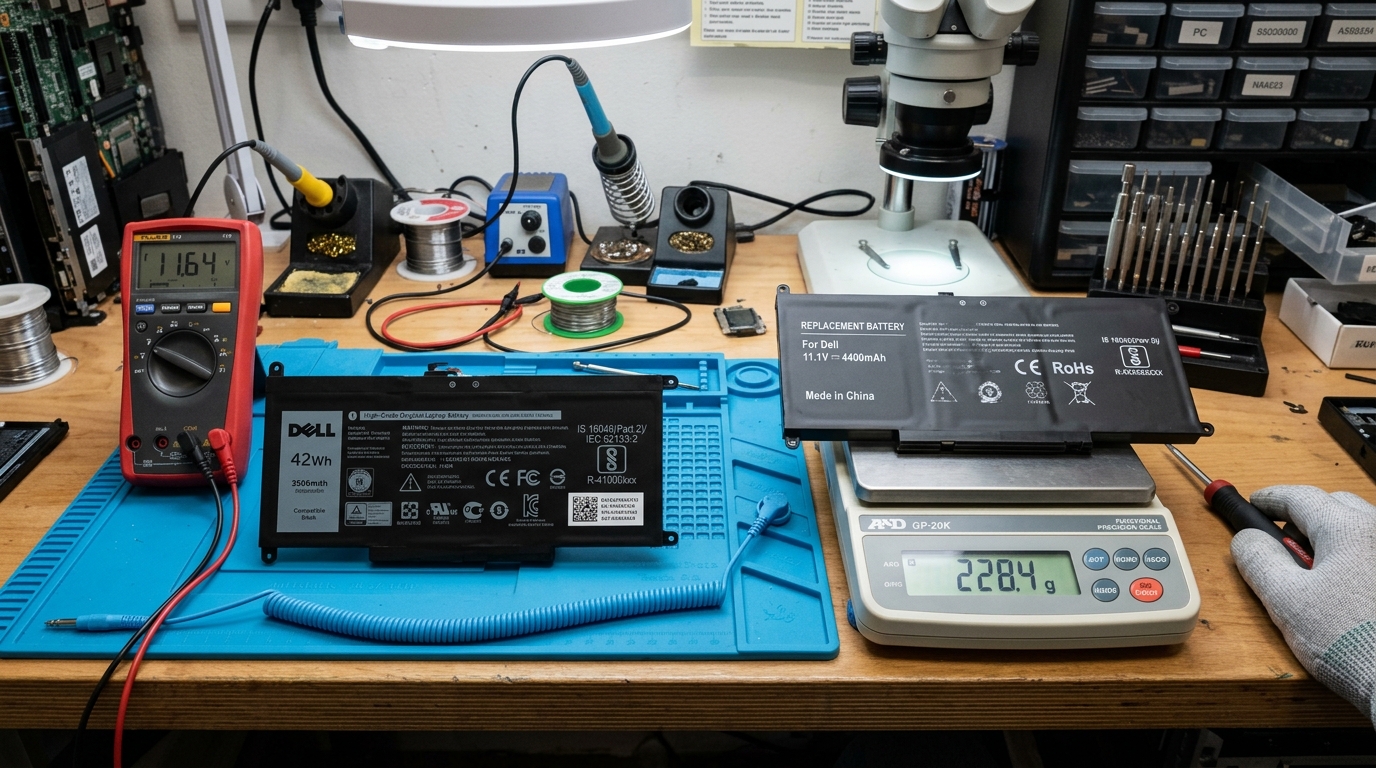 Comparing genuine vs counterfeit laptop battery weights on a digital precision scale in our Ahmedabad laboratory.
💣 The Dark Secret of "First Copy" & "Compatible" Batteries
First, let's clarify the misleading terminology used by dishonest vendors:
- Original (OEM): Manufactured directly by or for Dell, HP, Lenovo, ASUS, or Apple using tier-1 Grade-A lithium cells (manufactured by Samsung SDI, LG Chem, Panasonic, or Simplo) with a military-grade Texas Instruments Battery Management System (BMS) microchip.
- Reputable Third-Party Compatible: Brands like Anker or Duracell that clearly state their own brand name on the label and follow international safety standards.
- Counterfeit / First-Copy / Fake: Illegally manufactured in uncertified factories (mostly in southern China), printed with stolen Dell/HP/Lenovo brand logos, and designed to trick unsuspecting consumers into believing they are buying an authentic part.
What is Actually Inside a ₹1,400 Counterfeit Battery?
When our engineers slice open a counterfeit laptop battery casing in our testing lab, here is what we consistently find:
- Recycled Industrial Cells: Instead of fresh lithium polymer pouches, counterfeiters use discarded, second-hand 18650 cells stripped from scrapped electric scooters, cheap power banks, or decommissioned industrial packs.
- Hollow Ballast / Chalk Filling: Because recycled cells have lower energy density and weigh less, counterfeiters often pack cheap sand, chalk, or clay blocks inside the casing to mimic the physical weight of an original battery!
- No Battery Management Microchip: An original battery has a miniature computer on board (BMS) that constantly monitors temperature, voltage, and charging current. Fake batteries eliminate this expensive chip, replacing it with a crude, 50-paise ceramic resistor that has zero ability to stop power flow if cells overheat.
🔍 The 8-Point Forensic Checklist: Spotting a Fake Battery Like a Pro
Whenever you are purchasing a replacement battery for your Dell, HP, Lenovo, or ASUS laptop, inspect these 8 critical checkpoints before allowing the technician to screw it into your laptop chassis:
1. Weight & Cell Density (The Digital Kitchen Scale Test)
Lithium is a dense, heavy element. Genuine high-capacity Grade-A cells with proper copper shielding, thick thermal insulation, and multi-layer safety pouches are significantly heavier than cheap counterfeit assemblies.
- Original Dell 3-Cell Battery (e.g., WDX0R / YRDD6): Weighs between 215g to 235g.
- Counterfeit Dell Battery: Typically weighs between 155g to 180g (a massive 25% to 35% difference!).
💡 The Test: If you hold both batteries in your hands, the genuine battery will feel solid, dense, and evenly balanced. A counterfeit battery feels hollow, light, and plasticky. If a repair shop refuses to let you weigh or inspect the battery before installation, walk away immediately.
2. Label Printing, Font Crispness & Spelling Blunders
Counterfeiters cut corners on printing technology. They use low-resolution thermal transfer printers that produce blurry text, uneven font kerning, and misaligned logos.
What to Look For:
- Brand Logo Fidelity: On a fake Dell battery, the circular Dell logo is often slightly oval or the slanted "E" has uneven thickness. On fake HP batteries, the stylized four-slash HP logo has rounded, blurred edges instead of razor-sharp angles.
- Typographical Errors: Look closely at the fine-print safety instructions on the back. We have seen fake batteries printed with hilarious and alarming misspellings:
- "Do not despose of in fier" (instead of "Do not dispose of in fire")
- "Dangeros votlage" (instead of "Dangerous voltage")
- "Authentic Dell Conputer" (instead of "Dell Computer")
- Matte vs Glossy Finish: Genuine OEM labels are printed on durable, oil-resistant matte polycarbonate labels with uniform adhesives that never peel or bubble at the corners. Counterfeit labels use glossy, cheap paper stickers with air bubbles trapped underneath.
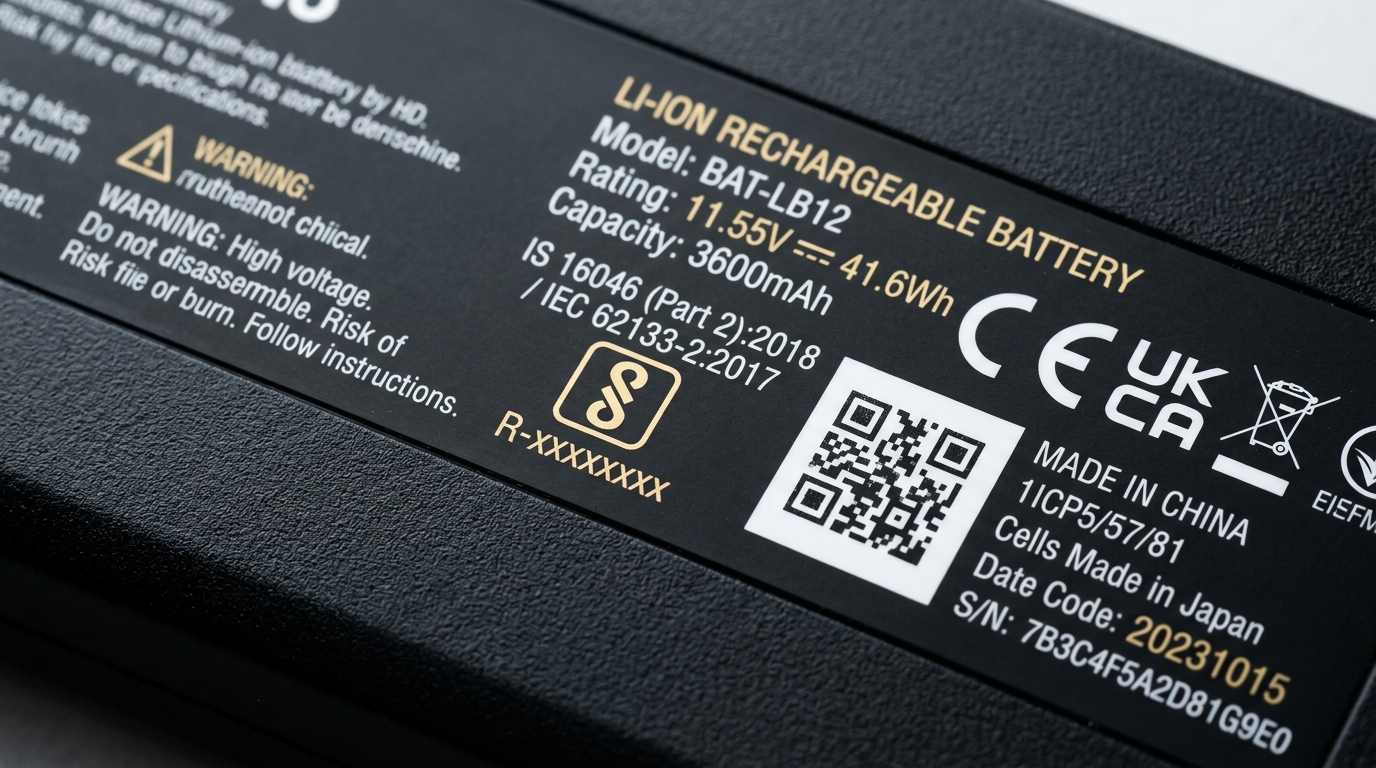 Macro inspection of an authentic battery label showing official BIS registration mark, sharp font kerning, and scannable tracking codes.
3. Regulatory Certification Logos & Valid BIS (R-Number)
In India, all lithium-ion laptop batteries sold legally must be certified by the Bureau of Indian Standards (BIS) and display the official "ISI / BIS" logo alongside a unique registration number:
$$\mathbf{R-4XXXXXXXX\text{ or }R-8XXXXXXXX}$$
How to Verify:
- Look for the standard BIS hallmark on the battery sticker: IS 16046 / IEC 62133.
- Below the logo, find the R-Number (e.g.,
R-41001234). - Open the official government BIS portal (
crsbis.in) on your phone and search the R-Number. - The Verdict: If the R-Number belongs to a different product (like an LED bulb or toaster), or doesn't exist in the database, the battery is an illegal counterfeit smuggled into the country.
4. Serial Number, QR Codes & Dell PPID Verification
Authentic laptop manufacturers use sophisticated serialization systems to track every individual battery from the manufacturing line to the end consumer.
For Dell Laptops (The PPID Code):
Every original Dell battery has a unique 20-character barcode known as the PPID (Piece Part Identification). It always follows this strict structure:
CN(Country of Origin, e.g., China)0WDX0R(The exact 5-character Dell Part Number)72438(Manufacturer supplier code)85E(Year/Month of manufacture date code)0452(Unique sequence number)A01(Firmware revision level)
🚩 The Red Flag: If you buy two batteries from a local shop and both have the exact same serial number, they are 100% fake. Counterfeiters print thousands of labels with the exact same copied serial code!
For HP Laptops (HP Spare Part Number & 14-Digit CT Barcode):
When searching for an authentic hp laptop battery original in Ahmedabad—whether an external clip-on pack like the hp hs04 battery original (807957-001, HSTNN-LB6V) and hp jc04 battery original (919701-850, HSTNN-LB7W), or an internal pack like ht03xl original battery (L11119-855, HSTNN-LB8L), TF03XL (920070-855), and SR04XL (917724-855)—inspect these three verification points:
- The "Replace with HP Spare" Label: Look for the official 6-digit prefix, hyphen, and 3-digit suffix (e.g.,
Replace with HP Spare 807957-001orL11119-855). On counterfeit HP batteries, the font kerning is uneven, the Hewlett-Packard or HP logo is blurry, and the spare number often does not match the actual laptop chassis. - The 14-Character CT Tracking Code: Next to the 2D matrix barcode, genuine HP batteries have a unique alphanumeric sequence starting with
CT:(for example,CT: 6DAEH02**B**...). This string records the exact battery cell assembly line, production week, and year. - HP Support Assistant & UEFI Verification: When installed, open HP Support Assistant > Battery Check > Advanced Information. A genuine HP OEM battery will display the manufacturer (e.g., Simplo, Dynapack, or Sunwoda), temperature readings, exact cell milli-voltages (Cell 1, Cell 2, Cell 3), and verified CT serial number. A counterfeit clone will display Unknown Manufacturer, N/A, or trigger HP Battery Alert 601.
5. The Battery Management System (BMS) Microchip: Safety vs Disaster
This is where the difference between genuine and fake batteries becomes a matter of life and death for your laptop.
| Feature | 100% Original Battery | Counterfeit "First-Copy" Battery |
|---|---|---|
| Fuel Gauge Controller | Texas Instruments BQ-Series (Smart Gas Gauge) | Cheap no-name microchip or passive resistor |
| Cell Temperature Monitoring | Real-time NTC thermistors on every cell pouch | Fake thermistor or fixed dummy resistor (always reads 25°C) |
| Over-Voltage Protection | Shuts down charging if voltage exceeds 4.4V/cell | None. Continues charging until cells boil and swell |
| Short-Circuit Cutoff | Trippable electronic safety fuse (< 1 millisecond response) | Bare copper trace (melts only after catastrophic smoke) |
| Expected Lifespan | 3 to 5 years (800 to 1,200 charge cycles) | 2 to 5 months (80 to 150 cycles) |
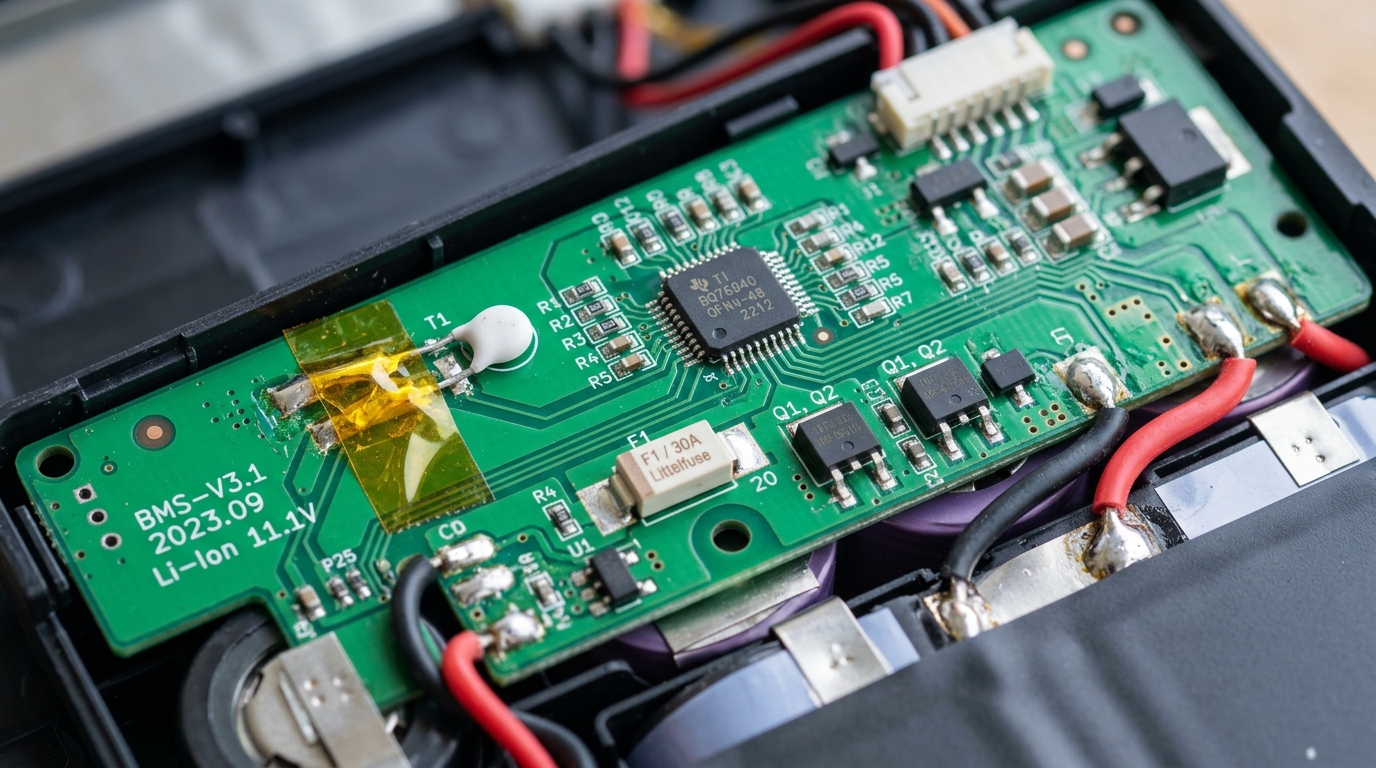 Internal teardown showing authentic Texas Instruments BQ-series fuel gauge and thermal protection cutoffs versus cheap uncertified clones.
6. Plastic Chassis Casing & Screw Lug Rigidity
Original laptop batteries are precision-engineered to slide into your laptop chassis with zero gap, zero friction, and exact screw alignment.
- Screw Lug Quality: The screw mounting tabs on an original battery are made of reinforced nylon plastic with brass threaded inserts. You can screw them in securely without cracking.
- Fake Battery Casing: Made of brittle recycled ABS plastic. When you tighten the chassis screws, the plastic lugs snap off immediately.
- Alignment Issues: Counterfeit batteries often require forcing or bending to make the screw holes line up with the laptop's motherboard standoffs. Never force a battery into place—if the holes do not align naturally, the battery is a generic clone.
7. Real Connector Pins (Gold-Plating vs Cheap Tin)
Look at the multi-pin connector that plugs into the laptop motherboard:
- Original: The connector pins are plated with genuine 24-karat gold flash to prevent oxidation, resist high electric currents, and ensure clean data transmission. The plastic guide rails are crisp and lubricated.
- Fake: Uses cheap tin or copper alloy pins. Within a few months, Ahmedabad's humid monsoon air oxidizes these pins, causing black carbon buildup. This causes intermittent power cuts and sparking at the connector.
8. Software Authentication (Dell BIOS & Windows Diagnostic)
Modern laptop motherboards are programmed to detect unauthorized battery clones:
- The Dell BIOS Warning: When you install a counterfeit battery in a Dell Inspiron or Latitude, the laptop will boot to a black screen with white text:
"WARNING: The battery cannot be identified. The system will be unable to charge this battery. Please insert a Dell-certified battery." - The HP Support Assistant Battery Check: When you run the official HP hardware diagnostics on a fake battery, the software will return:
Status: Unknown / Non-HP Battery Detected. The charging current will be artificially restricted to 500mA, meaning your laptop will take 8 hours to charge.
💸 The True Cost Calculation: Why a ₹1,400 Fake Battery Actually Costs You ₹8,000
Let's do the honest math that shady computer repair shops don't want you to calculate:
Scenario A: Buying a Cheap Fake Battery from a Local Market
- Initial Cost of Fake Battery: ₹1,400
- Lifespan: Lasts 3 to 4 months before dropping to 20 minutes of backup.
- Month 5: The unmonitored cells swell up, pushing against your trackpad and cracking the clickpad surface.
- Trackpad / Palmrest Repair Cost: ₹2,200
 Severe pouch swelling on a counterfeit battery pack removed from a damaged laptop chassis in Ahmedabad.
- Month 6: The fake battery suffers an internal short circuit, sending high voltage into the charging rail and frying the motherboard's BQ charging IC and power MOSFETs.
- Motherboard Chip-Level Repair: ₹3,500
- Replacement of the Dead Fake Battery: ₹1,400
- Total Spent in 6 Months: $\mathbf{₹1,400 + ₹2,200 + ₹3,500 + ₹1,400 = \mathbf{₹8,500}}$ (Plus weeks of downtime and lost work!).
Scenario B: Getting a 100% Original Battery from Zitek Techcare
- Cost of Genuine Original Battery: ₹2,800 to ₹3,800 (depending on model)
- Doorstep Installation & Diagnostic Testing: ₹0 (Included)
- Lifespan: 3 to 4 full years of reliable 4 to 7 hours of backup.
- Warranty: Up to 1-Year Full Replacement Guarantee.
- Motherboard Damage: ₹0 (100% Safe).
- Total Spent Over 4 Years: $\mathbf{₹3,200\text{ Flat!}}$
Buying an original battery saves you over ₹5,000 in repair bills and protects your priceless personal data from sudden crashes.
❓ Frequently Asked Questions (FAQ)
How can I tell if a laptop battery is original or fake?
Original batteries are notably heavier (weighing 40-70g more due to denser lithium cells and internal thermal shields), have laser-etched or high-resolution matte labels without typographical errors, feature valid government safety marks (such as BIS in India), and report a verified manufacturer serial number in BIOS and Windows diagnostics.
What is the difference between OEM, Grade-A compatible, and counterfeit batteries?
OEM (Original Equipment Manufacturer) batteries are manufactured for brands like Dell, HP, and Lenovo with tier-1 cells and proprietary smart microcontrollers. Grade-A compatible batteries are legitimate third-party brands that follow safety standards (CE, BIS) without infringing on trademarks. Counterfeits are illegal, uncertified copies falsely bearing brand logos.
How do I verify a Dell battery's authenticity?
Every authentic Dell battery has a 20-character barcode known as the PPID (Piece Part Identification) starting with "CN-" followed by the 5-character Dell part number (e.g., 0WDX0R), manufacturing code, date code, and unique sequence. In authentic batteries, this PPID is recognized by Dell SupportAssist and the ePSA BIOS hardware diagnostic.
What is a BIS R-number on an Indian laptop battery?
In India, the Bureau of Indian Standards (BIS) requires all lithium-ion cells and battery packs to carry registration under IS 16046 / IEC 62133 with an 8-digit R-number (e.g., R-41001234). You can verify this number on the official crsbis.in government portal to confirm that the battery was legally tested and approved.
Can a fake battery permanently damage a laptop motherboard?
Yes. Counterfeit batteries often omit internal thermal cutoffs and intelligent Battery Management System (BMS) controllers. Unregulated voltage spikes, reverse current, or internal cell short-circuits can blow out the motherboard's DC-IN MOSFETs and charging controller IC (such as the BQ-series chip).
Why do fake batteries cost so much less than original batteries?
Counterfeiters use discarded, recycled lithium cells from industrial battery packs, eliminate expensive smart microcontrollers, skip regulatory safety testing, and use brittle recycled plastics rather than flame-retardant polycarbonate enclosures.
What does the BIOS warning "The battery cannot be identified" mean?
This message indicates that the laptop motherboard's Embedded Controller (EC) cannot read the encrypted digital signature from the battery's microchip. This occurs when an uncertified clone battery is installed, or when the data pin on an original battery has failed.
How much does an original laptop battery cost compared to a duplicate in Ahmedabad?
In Ahmedabad, duplicate or low-grade compatible batteries typically sell for ₹1,200 to ₹1,600, but often degrade within a few months. Certified Grade-A compatible batteries cost ₹1,800 to ₹2,800, and 100% genuine OEM batteries range from ₹3,200 to ₹5,500, including warranty coverage.
🚀 How Zitek Techcare Guarantees Verified Batteries in Ahmedabad
At Zitek Techcare, we prioritize transparency and safety for computer owners across Ahmedabad and Gandhinagar.
- On-Site Serial Verification: Technicians unbox model-matched batteries at your home or office, allowing you to inspect labels, scan barcodes, and verify serial numbers in the BIOS before installation.
- Live Diagnostic Testing: We install the battery on your desk, check charging circuit health, and verify 100% capacity in the Windows Battery Report before payment.
- Comprehensive Coverage: Available across Satellite, Vastrapur, Bopal, SG Highway, Sindhu Bhavan Road, Nikol, Naroda, Maninagar, C.G. Road, Science City, Gota, Chandkheda, and Gandhinagar Sectors.
👉 Need a reliable battery for your Dell, HP, or Lenovo laptop today?
Explore our model-specific services: Dell Laptop Battery Replacement in Ahmedabad or our complete Laptop Battery Service Center in Ahmedabad.
📞 Call or WhatsApp Zitek Techcare right now: +91 90549 75943 for verified parts and prompt doorstep installation!

We are passionate hardware engineers who enjoy crafting engaging and informative repair guides. Apart from writing, you'll find our senior team exploring new tech trends and successfully reviving complex dead motherboards across Ahmedabad. We love discovering innovative concepts and bringing dead electronics back to life.