

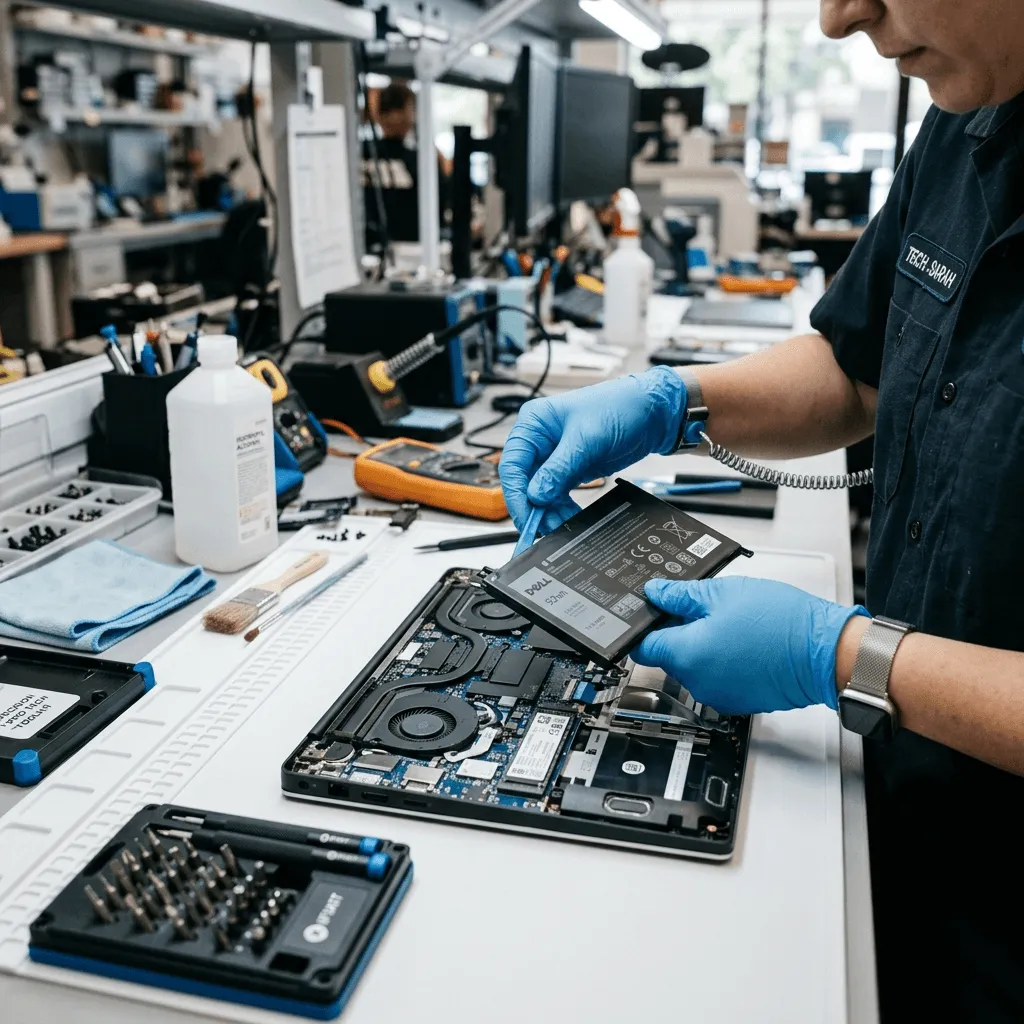
Welcome to the ultimate guide on Dell Inspiron battery replacements in Ahmedabad. As a laptop owner, experiencing battery degradation is a common, yet highly frustrating issue. Whether your device shuts down unexpectedly, struggles to hold a charge, or displays a bios warning symbol, understanding the root cause is crucial.
In this comprehensive guide, our senior hardware engineers at Zitek will walk you through the exact replacement costs, our transparent repair process, and the critical differences between genuine Dell batteries and dangerous counterfeit alternatives.
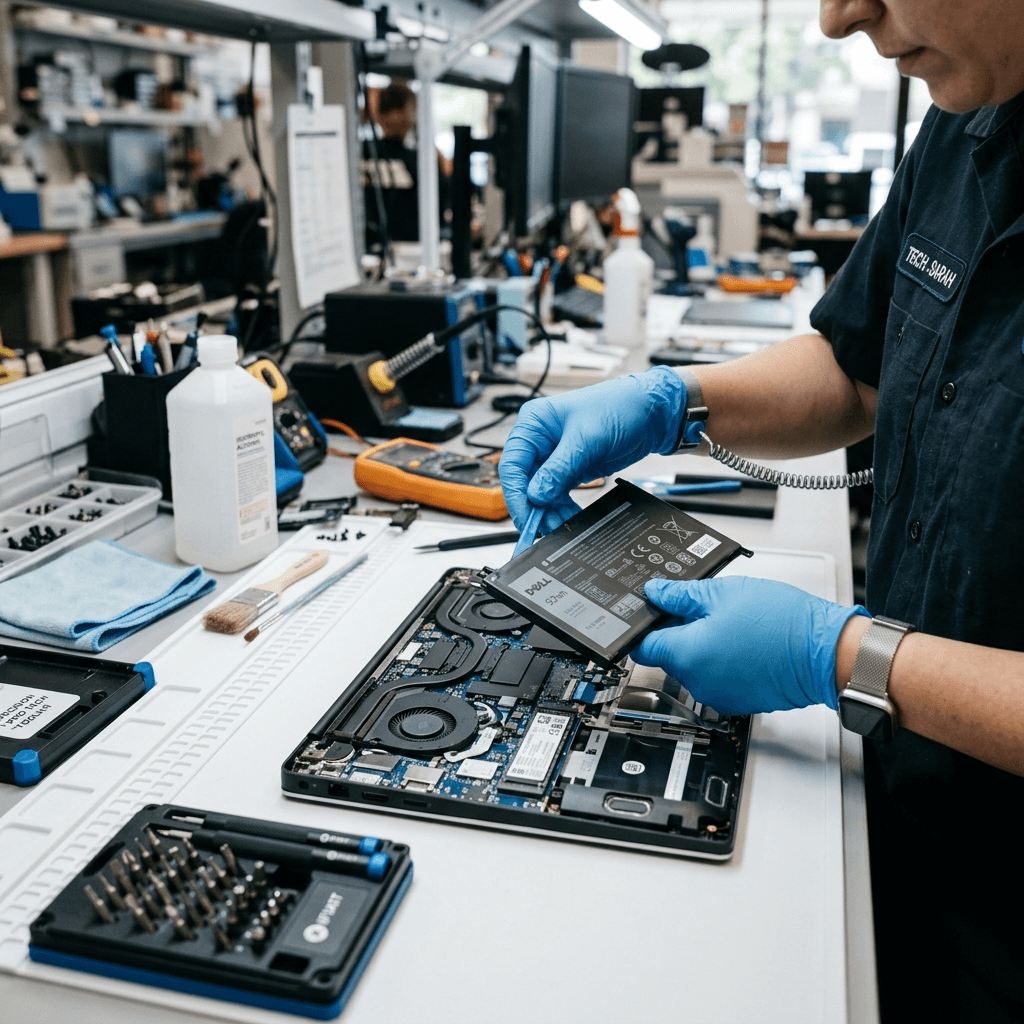 A professional engineer replacing a Dell Inspiron battery at a customer's desk in Ahmedabad.
How Do You Actually Know You Need a New Dell Battery?
You honestly don't need any expensive diagnostic software to know your battery is failing. Your laptop will literally tell you if you know what to look for. Here are the clear warning signs that the lithium cells inside your Dell Inspiron are completely exhausted:
The "10-Minute" Backup Warning
You leave your laptop plugged in all night, right? You wake up, it says 100% fully charged. You unplug the charger, sit on the couch to watch a YouTube video, and bam—exactly ten minutes later, the screen goes black. The laptop shuts down without even giving you a "low battery" warning.This means the lithium-ion cells inside are physically dead. They've just lost their ability to hold a charge. No amount of software updates or switching to "battery saver" mode is going to fix this. The hardware is just done.
The Laptop Body Starts Bulging (Extreme Danger!)
If your laptop trackpad suddenly feels super hard to click, or your keyboard feels like it's pushing upwards, stop using your laptop right away. Your internal battery has swollen up.
Why does this happen? When the chemicals inside an old lithium-ion battery fail, they produce a flammable gas. Since the battery is sealed in a tight pouch, the gas blows it up like a balloon, pushing against your trackpad from the inside.
Turn the laptop off right now. Don't even plug the charger in. A swollen battery is a massive fire hazard. It can literally burst into flames if the pressure gets too high. You need an expert to pull it out safely.
Sudden Power Cuts at 40%
Sometimes the battery icon on your screen says you still have 40% or 60% power left. You feel pretty confident. Then, you open Adobe Photoshop, Premiere Pro, or launch a game. Instantly, the laptop crashes.Why? Because the battery cells are unbalanced. The motherboard asks the battery for a sudden burst of power to run the heavy software, but the weak cells just can't push the voltage. The power drops, and the system hard crashes. This is a dead giveaway that you need a replacement.
Your Laptop Becomes Painfully Slow
Did you know that modern Dell laptops will intentionally slow down your processor if the battery is failing? If the battery chip detects that it can't provide stable voltage, it tells the motherboard to go into a super low-power mode so the laptop doesn't crash randomly. So, if your Dell Inspiron feels incredibly slow and laggy lately, the culprit might just be a dying battery—not a virus.The Dreaded BIOS Warning Message
Every time you turn on your Dell Inspiron, you get a black screen with white text saying: *"WARNING: The battery cannot be identified. The system will be unable to charge this battery."* You have to hit F1 just to continue booting. This simply means the communication chip inside the battery has died, and the motherboard is refusing to charge it for safety reasons.Why ₹1500 Fake Batteries Will Destroy Your Motherboard
If you take your laptop to a typical local repair shop in Relief Road, Bodakdev, or Thaltej, the guy behind the counter will probably offer you a "compatible" or "first-copy" battery for ₹1500 or ₹1800. It sounds like an awesome deal, right?
I'm telling you right now, as someone who repairs motherboards every day: Please, do not buy it. It's a huge mistake that's going to cost you heavily later.
The Missing Smart Chip
An original Dell battery is actually a really smart piece of tech. It has a microchip inside it called the BMS (Battery Management System). This chip constantly talks to your laptop's motherboard. It monitors the temperature, the cell voltage, and how many times it's been charged. But most importantly, it tells your charger exactly when to stop sending power so the battery doesn't overcharge.Those cheap fake batteries imported from China? They don't have this smart chip. To save manufacturing costs, they just use a cheap resistor. Because there's no smart chip to say "Stop, I'm full", the charger just keeps pushing raw power into the battery.
What happens next? The fake battery overheats, swells up really fast, and eventually, the massive power load burns out the charging IC (Integrated Circuit) on your motherboard.
📊 The Real Difference: Local Repair Shop vs Zitek Service
Let me show you exactly what you get at a generic shop versus what we actually do at Zitek.
| Feature / Service | ❌ Local Repair Shop | ✅ Zitek Service |
|---|---|---|
| The Battery Itself | Cheap Chinese Knock-off (First Copy/Duplicate) | 100% Genuine Dell Original Battery |
| Price Range | ₹1500 - ₹2000 (Looks cheap initially) | ₹2500 - ₹4500 (Exact Dell Official Price) |
| BMS Smart Chip | Missing or Fake (Massive Fire Hazard) | Genuine Dell Chip (Prevents Overcharging) |
| Motherboard Risk | Very High (Burns Power IC & Mosfets) | Safe, Tested, & Manufacturer Approved |
| Cell Quality | Grade C or Used Cells | Grade A+ Lithium-Ion / Li-Polymer |
| Lifespan | Barely lasts 3 to 6 months | Depends on usage (Usually 2 to 3 Years) |
| Warranty Support | "Store Warranty" (Often denied later) | 1-Year Official Replacement Warranty |
| Data Privacy | You leave your private data/laptop at a shop | Live Doorstep Installation in front of you |
You try to save ₹2000 on a fake battery, and you end up paying ₹12,000 for a complex motherboard repair when it shorts out. At Zitek, we strictly refuse to install fake parts. Your laptop's life is too important for that.
Dell Inspiron Battery Price List by Model (2025 Matrix)
Dell has pumped out thousands of Inspiron models over the years. The exact battery replacement price depends on your specific model number. To make it easy, we have compiled the ultimate Dell Inspiron battery compatibility and pricing matrix below.
| Dell Inspiron Series | Supported Laptop Models (Keywords) | Replacement Cost |
|---|---|---|
| Inspiron 3000 Series (M5Y1K / WDX0R) Dell Inspiron 15 3000 Battery |
3000, 3148, 3451, 3452, 3493, 3501, 3505, 3511, 3520, 3521, 3537, 3542, 3551, 3552, 3558, 3567, 3576, 3580, 3583, 3585, 3593 | ₹2,400 - ₹3,600 |
| Inspiron 5000 Series (WDX0R / 33YDH) Inspiron 5570, 5558, 5559, 5590 |
5000, 5100, 5368, 5370, 5378, 5379, 5423, 5447, 5480, 5481, 5482, 5491, 5502, 5510, 5520, 5521, 5523, 5537, 5547, 5548, 5555, 5558, 5559, 5565, 5566, 5567, 5568, 5570, 5575, 5577, 5578, 5579, 5580, 5584, 5593 | ₹2,600 - ₹4,200 |
| Inspiron 7000 Series High Capacity / Gaming |
7000, 7306, 7348, 7352, 7353, 7359, 7368, 7370, 7373, 7375, 7378, 7380, 7386, 7391, 7460, 7472, 7520, 7537, 7547, 7548, 7559, 7560, 7566, 7567, 7569, 7570, 7572, 7573, 7577, 7579, 7580, 7586, 7591 | ₹3,400 - ₹5,200 |
| Inspiron N-Series (J1KND) Legacy External Pack |
N4010, N4110, N5010, N5030, N5040, N5050, N5110, N7010, N7110, 14R, 15R | ₹1,900 - ₹2,800 |
| Most Searched Part Numbers Direct OEM Models |
M5Y1K (Inspiron 3558/5558), WDX0R (42Wh 5570), 33YDH (56Wh 7577), J1KND (N5010), 42Wh, G91J0, MV07R | ₹1,900 - ₹4,200 |
Note: The prices above reflect genuine original replacements that include the required BMS smart chip for safety.
Frequently Asked Questions (FAQ)
What is the replacement cost of a Dell Inspiron battery?
The average cost ranges from ₹2,500 to ₹4,500 depending on whether your laptop belongs to the 3000, 5000, or premium 7000 series. High-capacity or gaming batteries (like the 7567) may cost slightly more.How can I verify if my Dell Inspiron battery is original?
An original Dell battery will have a legitimate service tag, a built-in BMS chip, and provide exactly the same backup time as when the laptop was new. At Zitek, we scan the barcode in front of you to verify its authenticity.Is it worth replacing an old Dell Inspiron laptop battery?
Absolutely. Replacing a degraded battery instantly restores your laptop's mobility, prevents sudden crashes, and protects your motherboard from the dangerous voltage spikes caused by failing lithium cells.Expert Tip: Not sure what your model is? Flip your laptop upside down. You'll see a small sticker with a "Service Tag" (a 7-digit code). Just send that Service Tag to us on WhatsApp, and we'll instantly check it and give you the exact, 100% accurate price for your original battery. No guesswork!
How We Fix the "Plugged in, Not Charging" Issue
A lot of customers call me in a total panic, saying their Dell laptop shows "Plugged in, not charging" on the screen. Before you go spending thousands of rupees on a new battery, hold on! This error doesn't always mean you need a new battery.
As a professional motherboard guy, I check four critical hardware points before I ever suggest replacing the battery:
Step 1: The Charger Center Pin Check
Dell original chargers have a tiny, needle-like pin right inside the round plug. This pin is basically a data line. It tells the motherboard, "Hey, I'm an original 65W charger, please let the battery charge." If this pin gets bent, breaks, or gets pushed inside, the laptop will turn on just fine, but it will absolutely refuse to charge the battery. I always test your laptop with my own diagnostic charger first. If it charges with my charger, you just need a new adapter—your battery is fine!
Step 2: Broken DC Power Jack
The charging port (DC Jack) on the side of your laptop takes a lot of physical abuse over the years. If you trip over the wire, the internal solder joints can crack. If the data connection is lost, charging stops. In our lab, we open the laptop, pull out the motherboard, and micro-solder a brand new DC jack. It's a precise repair, but it saves you a lot of money.
Step 3: Burnt Motherboard Charging IC
If the charger is perfect and the port is fine, but the battery still won't charge, the power management chip on the motherboard has shorted out. This usually happens because of severe power fluctuations in your house. We do advanced micro-soldering under a microscope to replace this exact chip and get the charging circuit running again.
Step 4: Actual Battery Failure
If the motherboard, charger, and port pass all our strict tests, then and only then do we conclude that the battery itself is dead. That's when we'll go ahead and install a brand new original Dell battery. I believe in honest diagnostics.
Zitek Doorstep Service in Ahmedabad
You really don't need to unplug all your cables, drive through Ahmedabad traffic, and leave your laptop at a dusty repair shop for two whole days. Your laptop has your personal photos, your business emails, and your private data.
We respect your privacy and your time. That's why Zitek offers a transparent doorstep laptop repair service all across Ahmedabad. We do the hardware replacement right in front of your eyes, at your home or office desk. Here's how simple our process is:
- Get an Instant Quote: Call us or message us your laptop model or Service Tag. We check our live stock and give you a transparent, upfront price for an original battery. Absolutely no hidden fees.
- We Come to You: Our certified hardware engineer comes to your location anywhere in Ahmedabad (Vastrapur, Bopal, SG Highway, Prahladnagar, you name it). We don't charge any extra travel fees.
- Deep Cleaning: We don't just slap a battery in and run away. The engineer places your laptop on an anti-static mat, carefully opens the bottom cover, and uses a professional blower to clean all the trapped dust out of your cooling fan and heatsink. This crucial step stops your laptop from overheating and extends the life of the new battery.
- Precision Installation: Using safe plastic pry tools so no clips get broken, we install the new original battery perfectly.
- Final BIOS Testing: We turn the laptop on, enter the Dell BIOS, and show you the screen that says "Battery Health: Excellent". You verify that the laptop is charging and holding power.
- Payment & Warranty: Only when you're 100% satisfied, you pay. We give you a proper digital invoice and activate your 1-year official replacement warranty.
How to Make Your New Laptop Battery Last 3 to 4 Years
Look, lithium-ion batteries degrade over time. It's just unavoidable chemistry. But how you treat your laptop decides how fast that happens. Follow these expert rules to squeeze the maximum life out of your battery.
Keep the Laptop Extremely Cool
Heat is the absolute worst enemy of a lithium battery. Please don't use your laptop on a bed, a blanket, or a fluffy pillow. Blankets block the cooling vents underneath the laptop. The processor gets incredibly hot, and that heat transfers straight into the battery, permanently ruining the chemical cells. Always use your laptop on a flat wooden table or a hard surface.
Do Not Drain to Zero Percent
Never let the battery drop all the way to 0% until the laptop dies. Draining a lithium battery completely puts massive stress on the internal cells. This is called a "deep discharge" and it ruins the battery's capacity to hold a charge. Make it a habit to plug the charger back in when the battery level hits 20%.
Use Dell Power Manager (Limit Charging to 80%)
If you work in an office and keep the charger plugged in 24/7, you're slowly cooking the battery. Keeping a lithium battery constantly at 100% causes the cells to swell up over time because of the stress.
Do yourself a favor and download the free "Dell Power Manager" software from the Microsoft Store. Go to settings and change the thermal management to "Primarily AC Use" or set a custom charge limit (Start charging at 50%, Stop at 80%). This simple software trick stops the charging at 80% and can literally double the overall lifespan of your battery.
Frequently Asked Questions (FAQs)
How much does a Dell Inspiron original battery cost in Ahmedabad?
How can I check the exact health of my Dell laptop battery without any software?
cmd, right-click on "Command Prompt", and select "Run as Administrator". Type exactly this: powercfg /batteryreport and press Enter. Windows will generate an incredibly detailed HTML file saved to your main drive. Open that file in your browser and scroll down to compare "Design Capacity" against "Full Charge Capacity". If your Design Capacity was 42,000 mWh and your Full Charge Capacity is now below 20,000 mWh, your battery has physically degraded by over 50% and is chemically exhausted.
Can a swollen laptop battery explode? Is it safe to keep using?
Continuing to charge or use a swollen battery is extremely dangerous. A sudden physical impact or continued overcharging can puncture the pouch, exposing the lithium to oxygen, which results in an immediate thermal runaway fire. Turn off your laptop immediately and schedule a professional extraction.
How long does a brand new Dell battery typically last before dying?
To maximize longevity, we highly recommend installing the free "Dell Power Manager" software. By setting a custom charge limit (e.g., start charging at 50%, stop charging at 80%), you reduce the voltage stress on the lithium cells, often doubling the battery's lifespan.
Does Zitek provide doorstep laptop battery replacement anywhere in Ahmedabad?
Instead of leaving your laptop at a repair shop for days and risking data theft, our certified component-level engineers come directly to your home or office. We open the laptop in front of you, clean the internal fans, install the new original battery, verify the BIOS health status, and only charge you once you are 100% satisfied. All replacements come with an immediate digital invoice and a solid 1-year official replacement warranty.
My Final Advice to You
I'll say it one last time: Please, whatever you do, don't put a fake battery in your laptop. Don't risk a severe motherboard short circuit, losing your data, or starting a fire just to save a few hundred rupees. It's just not worth the risk. Your laptop is an expensive machine—treat it with respect.
If your battery is dead, swollen, or refusing to charge, get a 100% original Dell replacement installed by a real, experienced hardware guy.
Get in touch with Zitek today. We'll come directly to your home or office anywhere in Ahmedabad and fix your laptop right in front of your eyes. It's transparent, professional, and fast.
Hardware Support: +91 9054975943
🔗 Related Dell Hardware & Power Guides:
- Dell Latitude & Vostro Battery Replacement Guide Ahmedabad
- Dell Laptop Charger & Adapter Guide: 45W, 65W, 90W & Type-C GaN
- Fix Dell 'Plugged In, Not Charging' & AC Power Adapter Warning
- How to Check Laptop Battery Health in Windows 11
We provide service across all Ahmedabad areas (Vastrapur, Bopal, SG Highway, Bodakdev, Thaltej, Prahladnagar, Chandkheda, Satellite, Gota, etc). To check if service is available in your area, click here to check your area.