
Is your laptop stuttering when you switch between twenty Google Chrome tabs, crashing while compiling code in Visual Studio Code or Android Studio, or freezing whenever you run Tally Prime alongside heavy Microsoft Excel spreadsheets? In today's software environment, where the Windows 11 operating system alone consumes between 3.5GB and 4.2GB of physical memory just at idle desktop, an under-configured laptop with 4GB or 8GB of RAM quickly runs out of physical memory. When RAM fills up, Windows is forced to page memory chunks onto your storage drive (pagefile.sys), causing severe micro-stutters, app crashes, and unbearable system sluggishness.
In this exhaustive hardware engineering reference, our senior hardware diagnostic engineers at Zitek provide complete transparency on genuine 2026 laptop RAM upgrade prices in Ahmedabad and Gandhinagar. We analyze the complete architecture of laptop memory: from legacy DDR2 SO-DIMMs for vintage terminals, to Gujarat's most-searched DDR3L 12800S 1.35V low-voltage modules, high-speed DDR4 SO-DIMMs (2400MHz, 2666MHz, 3200MHz, and 3600MHz kits priced up to ₹12,000), next-generation DDR5 modules (4800MHz to 5600MHz with On-Die ECC), dual-channel bus bandwidth advantages, CAS latency timings, soldered RAM expansion slots, semiconductor spot price volatility terms, and our certified 30-minute doorstep installation service with an official 3 to 5 Years Manufacturer Replacement Warranty.
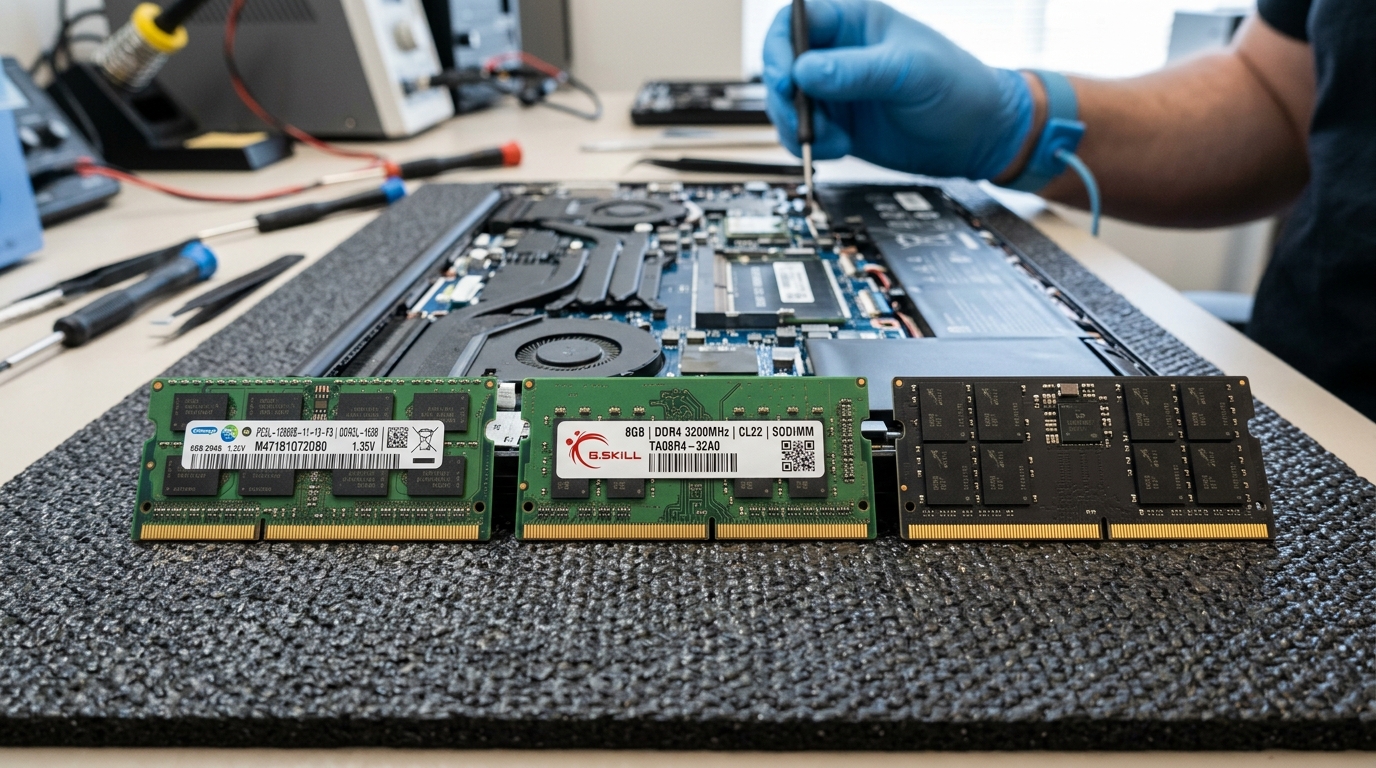 Certified laptop RAM diagnostic and installation station at Zitek Ahmedabad featuring genuine Crucial by Micron, Samsung OEM, SK Hynix, and Kingston SO-DIMM memory modules across DDR2, DDR3L, DDR4, and DDR5 standards.
Direct Answer: How Much Does a Laptop RAM Upgrade Cost in Ahmedabad in 2026?
💡 સિનિયર એન્જિનિયર ગાઇડ: અમદાવાદમાં લેપટોપ RAM અપગ્રેડ કરાવવાનો વાસ્તવિક ખર્ચ કેટલો થાય?
અમદાવાદ અને ગાંધીનગરમાં ઓન-સાઇટ ડોરસ્ટેપ ટેસ્ટિંગ, ESD-safe ફિટમેન્ટ, ડ્યુઅલ-ચેનલ કેલિબ્રેશન અને સત્તાવાર કંપની વૉરંટી સાથે જેન્યુઇન લેપટોપ RAM અપગ્રેડનો ખર્ચ જૂના DDR2 મોડ્યુલ્સ માટે ₹૯૫૦ થી લઈને હાઇ-એન્ડ DDR5 વર્કસ્ટેશન કિટ્સ માટે ₹૧૬,૫૦૦ સુધી થાય છે:
- DDR2 લેગસી SO-DIMM (2GB 667MHz / 800MHz): ₹૯૫૦ – ₹૧,૬૫૦ (Core 2 Duo લેપટોપ્સ અને બિલિંગ પીસી માટે ટેસ્ટેડ મોડ્યુલ્સ)
- DDR3 / DDR3L 12800S SO-DIMM (4GB 1600MHz 1.35V): ₹૧,૦૦૦ – ₹૧,૪૫૦ (Dell Inspiron 3521/3542, HP 15-r, Lenovo G50 મોડેલ્સ)
- DDR3 / DDR3L 12800S SO-DIMM (8GB 1600MHz 1.35V): ₹૧,૮૫૦ – ₹૨,૯૫૦ (૩ થી ૬ઠ્ઠી પેઢીના લેપટોપ્સ માટે મેક્સિમમ કેપેસિટી)
- DDR4 સિંગલ મોડ્યુલ (8GB 2400 / 2666 / 3200MHz): ₹૧,૮૫૦ – ₹૨,૬૫૦ (૭ થી ૧૨મી પેઢીના Intel અને Ryzen લેપટોપ્સ માટે સ્ટાન્ડર્ડ)
- DDR4 સિંગલ મોડ્યુલ (16GB 2666 / 3200MHz): ₹૩,૪૦૦ – ₹૪,૫૦૦ (કોર્પોરેટ પ્રોફેશનલ્સ, ડેવલપર્સ અને હેવી એક્સેલ યુઝર્સ માટે)
- DDR4 ડ્યુઅલ-ચેનલ પર્ફોર્મન્સ કિટ્સ (32GB / 64GB કિટ): ₹૫,૫૦૦ – ₹૧૨,૦૦૦ (AutoCAD, 3D રેન્ડરિંગ, વિડીયો એડિટિંગ અને ગેમિંગ લેપટોપ્સ)
- DDR5 નેક્સ્ટ-જનરેશન SO-DIMM (8GB / 16GB / 32GB 4800–5600MHz): ₹૩,૨૦૦ – ₹૧૬,૫૦૦ (Intel 12th–14th Gen અને Ryzen 7000/8000 વર્કસ્ટેશન્સ)
Semiconductor Market Volatility & Daily Spot Rate Terms (ભાવ વધઘટ અંગેની શરતો)
📌 સેમિકન્ડક્ટર માર્કેટ અને રેમ કિંમત વધઘટ અંગેની વ્યવહારુ સ્પષ્ટતા
કમ્પ્યુટર રેમ (DDR2, DDR3, DDR4, DDR5 DRAM) મોડ્યુલ્સના ભાવો આંતરરાષ્ટ્રીય સેમિકન્ડક્ટર સ્પોટ માર્કેટ, વૈશ્વિક AI સર્વર નિર્માણ (AI Data Center HBM/DDR5 Boom) અને યુએસ ડોલર સામે રૂપિયાના વિનિમય દર (USD/INR) ના કારણે અવારનવાર વધઘટ પામતા હોય છે:
- દૈનિક સ્પોટ રેટ: આ આર્ટિકલમાં દર્શાવેલા ભાવો માર્કેટની સામાન્ય સ્થિતિ દર્શાવે છે. આજના ચોક્કસ લાઇવ સ્પોટ રેટ, બ્રાન્ડ ઉપલબ્ધતા (Crucial Micron, Samsung OEM, SK Hynix, Kingston Fury) અને ડોરસ્ટેપ ફિટમેન્ટ ચાર્જ જાણવા માટે ઓર્ડર કન્ફર્મ કરતાં પહેલાં Zitek એન્જિનિયર સાથે ફોન કે વોટ્સએપ પર પુષ્ટિ કરવી જરૂરી છે.
- સત્તાવાર ૩ થી ૫ વર્ષની વૉરંટી: કોઈપણ મેમરી મોડ્યુલ પર "લાઇફટાઇમ વૉરંટી" હોતી નથી. તમામ જેન્યુઇન મોડ્યુલ્સ સત્તાવાર ૩ વર્ષથી ૫ વર્ષની બ્રાન્ડ રિપ્લેસમેન્ટ વૉરંટી ધરાવે છે.
- ૧૦૦% પાકું GST બિલિંગ: તમામ કિંમતોમાં કાયદેસર પાકું GST ઇન્વોઇસ સામેલ હોય છે જેનાથી ભવિષ્યમાં કંપની કે ઓથોરાઇઝ્ડ સર્વિસ સેન્ટર પર વૉરંટી ક્લેમ કરવામાં ગ્રાહકને કોઈ અડચણ પડતી નથી.
🛡️ ગ્રાહક ડેટા સુરક્ષા અને બેકઅપ અંગેની નીતિ (કાયદેસર સ્પષ્ટતા)
ડેટા બેકઅપની ૧૦૦% સંપૂર્ણ જવાબદારી ગ્રાહકની પોતાની રહેશે:
લેપટોપમાં RAM અપગ્રેડ, મેમરી મોડ્યુલ ફિટમેન્ટ કે હાર્ડવેર સર્વિસ કરાવતાં પહેલાં પોતાના અંગત, વ્યાપારી તથા સોફ્ટવેર ડેટાનો બેકઅપ લેવાની સંપૂર્ણ જવાબદારી ગ્રાહકની પોતાની છે. અગાઉથી જૂની હાર્ડ ડ્રાઇવમાં રહેલા બેડ સેક્ટર્સ (Bad Sectors), પાવર સર્જ, મધરબોર્ડ શોર્ટ કે અનપેક્ષિત હાર્ડવેર ફેલ્યોરના કારણે થતા કોઈપણ પ્રકારના ડેટા લોસ (Data Loss) માટે Zitek, તેના સંચાલકો કે ફિલ્ડ ટેકનિશિયનની કોઈ કાયદેસર, આર્થિક કે નૈતિક જવાબદારી રહેશે નહીં.
Why 8GB RAM Is No Longer Sufficient for Windows 11 in 2026
A decade ago, 4GB of RAM was considered adequate, and 8GB was considered ample for power users. In 2026, the computing landscape has transformed fundamentally:
| Operating System & Software Layer | Minimum Memory Footprint | Active Memory In-Use (Typical Workflow) | Architectural Impact on 8GB Systems |
|---|---|---|---|
| Windows 11 Core OS & System Services | 3.5 GB | 3.8 GB to 4.2 GB (DWM, Defender, Telemetry) | Consumes 50% of installed physical RAM before launching any software |
| Integrated GPU Shared VRAM (Iris Xe / Radeon) | 1.0 GB | 1.5 GB to 2.5 GB (Dynamic Frame Buffer) | Carved directly from system RAM, reducing usable OS memory to ~5.5GB |
| Google Chrome / Edge (15–20 Multi-Tabs) | 2.0 GB | 2.8 GB to 3.8 GB (Sandboxed Processes) | Pushes total memory usage past 88%, triggering aggressive disk paging |
| Tally Prime + Microsoft Excel (Macro Sheets) | 1.2 GB | 2.0 GB to 3.2 GB (Large Ledger Caching) | Memory thrashing causes spreadsheet freezing and delayed print spooling |
| Full-Stack Development (VS Code + Docker + Node) | 4.0 GB | 6.5 GB to 10.0 GB (Virtual Machine Containers) | System halts entirely; requires 16GB minimum or 32GB recommended |
- Operating System Footprint: Windows 11 with modern security layers (Core Isolation, Memory Integrity, Hypervisor-Protected Code Integrity, and Windows Defender Real-time Telemetry) consumes approximately 3.5GB to 4.2GB of RAM upon initial boot before you launch a single application.
- Web Browser Architecture: Modern web browsers (Google Chrome, Microsoft Edge, Mozilla Firefox) utilize multi-process sandboxing architectures. Each open browser tab, active web extension, and running script runs in its own isolated process space to prevent single-page crashes. A typical workflow with 15 to 20 tabs—especially modern web applications like Canva, Google Sheets, WhatsApp Web, and LinkedIn—consumes between 2.5GB and 4.0GB of RAM.
- Hardware-Reserved Memory & Integrated Graphics (iGPU): Modern laptops lacking dedicated graphics cards (Nvidia GeForce or AMD Radeon) rely on processors with integrated graphics (Intel UHD, Intel Iris Xe, AMD Radeon Vega / 680M / 780M). The system motherboard automatically dynamically carves out 1.0GB to 2.5GB of main system RAM to serve as shared Video RAM (VRAM) for display rendering. If your laptop has only 8GB of total physical RAM, your operating system is left with barely 5.5GB of usable memory!
- The Pagefile Disk Thrashing Trap: The millisecond physical RAM usage crosses 85%, the Windows Memory Manager begins aggressively pushing idle memory pages into the
pagefile.sysfile on your storage drive. Even on a fast NVMe SSD, solid-state flash memory operates at microsecond speeds, whereas physical DDR4/DDR5 RAM operates at nanosecond speeds (over 50 to 100 times faster). This continuous swapping causes noticeable micro-stuttering, cursor lag, and sluggish app switching. Upgrading to 16GB or 32GB completely eliminates pagefile swapping, keeping all applications instant and responsive.
Generational Architecture Deep-Dive: DDR2, DDR3, DDR3L, DDR4, and DDR5
Motherboard memory slots are physically keyed and electrically engineered for specific generations. Memory standards are strictly non-interchangeable: you cannot install a DDR3 stick into a DDR4 motherboard, nor a DDR4 stick into a DDR5 motherboard.
Below is an engineering comparison of all four standards encountered in laptop computers across Gujarat:
| Generation Standard | Form Factor | Pin Count | Operating Voltage | Standard Bus Frequencies | Peak Memory Bandwidth | Key Architectural Features & Target Platforms |
|---|---|---|---|---|---|---|
| DDR2 SO-DIMM | 200 Pins | 200 Pins | 1.80 Volts | 667 / 800 MHz (PC2-5300S / PC2-6400S) | Up to 6.4 GB/s | Vintage Core 2 Duo, POS supermarket billing, CNC lathes, GIDC terminals |
| DDR3 SO-DIMM | 204 Pins | 204 Pins | 1.50 Volts | 1333 / 1600 MHz (PC3-10600S / PC3-12800) | Up to 12.8 GB/s | Intel 1st & 2nd Gen Core (Sandy Bridge); incompatible with 4th Gen+ |
| DDR3L Low-Voltage | 204 Pins | 204 Pins | 1.35V Dual-Voltage | 1600 MHz CL11 (PC3L-12800S) | Up to 12.8 GB/s | Gujarat's #1 Search Code: Mandatory for Intel 3rd to 6th Gen Core |
| DDR4 SO-DIMM Single | 260 Pins | 260 Pins | 1.20 Volts | 2400 / 2666 / 3200 MHz (PC4-25600) | Up to 25.6 GB/s | Mainstream standard for Intel 7th to 12th Gen & AMD Ryzen 2000–5000 |
| DDR4 Dual Pro Kits | 260 Pins | 260 Pins | 1.20V / 1.35V XMP | 2666 / 3200 / 3600 MHz (PC4-28800) | Up to 51.2 GB/s | ₹5,500–₹12,000 Kits: Dual-channel matched pairs for CAD, 4K & gaming |
| DDR5 Next-Gen | 262 Pins | 262 Pins | 1.10 Volts | 4800 / 5200 / 5600 MHz (PC5-44800) | Up to 44.8 GB/s | On-Die ECC + Dual 32-bit Subchannels: Intel 12th–14th Gen & Ryzen 7000/8000 |
1. DDR2 SO-DIMM: The Legacy Workhorse (667MHz & 800MHz)
DDR2 memory features 200 pins and operates at a relatively high voltage of 1.80 Volts. First introduced in 2003, DDR2 was standard across the legendary Intel Core 2 Duo, Pentium Dual-Core, and early AMD Turion platforms (such as the Dell Latitude D630, Inspiron 1525, HP Pavilion dv6000, and Lenovo ThinkPad T60/T61).
In industrial and business hubs across Ahmedabad (such as Vatva GIDC, Naroda GIDC, and Changodar), many manufacturing plants still run specialized CNC cutting machinery, computerized lathe controllers, and legacy POS supermarket billing computers powered by Core 2 Duo motherboards. Because brand-new DDR2 manufacturing lines were decommissioned years ago, Zitek maintains a certified, laboratory-tested stock of genuine 2GB DDR2-667 (PC2-5300S) and DDR2-800 (PC2-6400S) modules. Every module undergoes a strict 4-pass MemTest86 stress audit to guarantee zero bit flips for our industrial clients.
2. DDR3 vs DDR3L: Understanding Gujarat's #1 Search Code "12800S"
The transition between DDR3 and DDR3L represents one of the most common pitfalls in laptop repair:
- Standard DDR3 (PC3-12800): Operates at 1.50 Volts. Designed for Intel 1st and 2nd Generation Core processors (Nehalem and Sandy Bridge).
- DDR3L Low-Voltage (PC3L-12800S): Operates at 1.35 Volts (with backward compatibility for 1.50V). Introduced with Intel 3rd Generation (Ivy Bridge) and made mandatory with Intel 4th Generation (Haswell), 5th Gen (Broadwell), and 6th Gen (Skylake).
- The Fatal Voltage Trap: If an inexperienced technician installs an older 1.50V DDR3 module into a 4th or 5th Gen laptop (such as a Dell Inspiron 3542 or HP 15-r), the laptop's power management IC cannot supply 1.50V without damaging the integrated memory controller on the CPU die. The motherboard immediately halts initialization: the power LED turns on, the cooling fan spins, but the screen remains completely black with no display! At Zitek, our technicians carry genuine PC3L-12800S 1.35V dual-voltage modules from Crucial, Samsung, and SK Hynix, guaranteeing 100% stable compatibility.
3. DDR4 SO-DIMM: High-Speed Bandwidth & Performance Kits
Operating at a power-saving 1.20 Volts with 260 pins, DDR4 represents the industry standard across millions of laptops running Intel 7th to 12th Gen processors and AMD Ryzen 2000 to 5000 series chips:
- Frequencies Available: DDR4 is deployed across standardized JEDEC frequencies: 2133 MHz (PC4-17000), 2400 MHz (PC4-19200), 2666 MHz (PC4-21300), and 3200 MHz (PC4-25600), with enthusiast XMP gaming modules reaching 3600 MHz (PC4-28800).
- Single Sticks vs Matched Dual-Channel Kits (₹5,500 – ₹12,000): While adding a single 8GB module (₹1,850 – ₹2,650) is perfect for everyday office work, professional software developers, 3D CAD engineers, and gamers require matched high-capacity dual kits. A 32GB Kit (16GB x 2) or 64GB Kit (32GB x 2) running at 3200MHz or 3600MHz CL16/CL18 costs between ₹5,500 and ₹12,000. Matched kits ensure identical silicon binning, identical CAS latencies, and flawless 128-bit dual-channel operation without timing mismatches.
4. DDR5 SO-DIMM: Next-Generation Speed with On-Die ECC
Introduced alongside Intel 12th Gen Alder Lake and AMD Ryzen 6000/7000 series mobile platforms, DDR5 operates at an ultra-efficient 1.10 Volts with 262 pins:
- On-Die ECC (ODECC): Unlike consumer DDR4 which lacked error correction, every DDR5 memory die incorporates hardware-level On-Die Error Correction Code. This detects and corrects single-bit electrical flips directly inside the DRAM chip, delivering server-grade stability in portable laptops.
- Dual 32-Bit Independent Subchannels: A single DDR4 stick operates on one 64-bit data channel. A single DDR5 stick is split internally into two independent 32-bit subchannels (plus 8 bits of ECC). This enables concurrent memory accesses, dramatically reducing queue latency and doubling effective memory efficiency.
- Integrated PMIC: On DDR4 motherboards, voltage regulation was handled by components on the laptop motherboard. DDR5 moves the Power Management Integrated Circuit (PMIC) directly onto the RAM module itself, enabling cleaner power delivery and lower motherboard thermal strain.
Single-Channel vs Dual-Channel & Intel Flex Mode Demystified
Many laptop owners assume that having 16GB of RAM is identical regardless of how it is installed. From a computer hardware engineering standpoint, this assumption is completely incorrect:
| Memory Bus Architecture | Number of Modules Installed | Bus Width | Peak Memory Bandwidth (DDR4-3200) | Integrated Graphics (iGPU) Impact | Real-World Gaming & App Impact |
|---|---|---|---|---|---|
| Single-Channel Mode | 1x 16GB Module | 64-Bit Bus | ~25.6 GB/s | Severe 40% bandwidth starvation on Iris Xe / Radeon | Micro-stutters in games, slow 4K video rendering export |
| Dual-Channel Mode | 2x 8GB Modules | 128-Bit Bus | ~51.2 GB/s (100% DOUBLING!) | Unlocks full execution units on integrated GPU | +40% to +75% higher FPS; smooth frame times |
| Intel Flex Mode | 1x 4GB Soldered + 1x 8GB Stick | 128-Bit (8GB) + 64-Bit (4GB) | Hybrid 51.2 GB/s + 25.6 GB/s | First 8GB runs in full dual-channel; remainder in single | Eliminates multitasking freeze on semi-soldered laptops |
- Doubling the Memory Bus Width: A single stick of RAM connects to the memory controller over a 64-bit data bus. When two identical sticks are installed into complementary slots, the CPU memory controller activates Dual-Channel Mode (128-bit bus width). This effectively doubles theoretical memory bandwidth from approximately 25.6 GB/s to 51.2 GB/s on DDR4-3200!
- Impact on Integrated Graphics (iGPU): If your laptop utilizes Intel Iris Xe or AMD Radeon graphics, your graphics processor does not have dedicated high-speed GDDR6 VRAM. Instead, it relies 100% on system RAM for frame rendering. Upgrading from single-channel to dual-channel memory delivers an immediate 40% to 75% increase in gaming frame rates (FPS) and renders 4K video exports significantly faster.
- Intel Flex Memory Mode (Asymmetrical Dual-Channel): What happens if your laptop has 4GB or 8GB of memory permanently soldered to the motherboard, and you install an additional 16GB stick in the open slot (totaling 24GB)? Thanks to Intel Flex Mode and AMD Asymmetric Memory Architecture, the memory controller matches the 8GB soldered memory with 8GB of the expansion stick, running that primary 16GB in full Dual-Channel 128-bit mode. The remaining 8GB operates seamlessly in single-channel mode for background caching.
Memory Rank Architecture: 1Rx8 vs 2Rx8 vs the 1Rx16 Bottleneck Trap
When purchasing RAM online, most consumers only look at the capacity (e.g., 8GB) and frequency (e.g., 3200MHz), completely ignoring the Memory Rank Architecture printed on the module sticker:
- 1Rx8 (Single-Rank, 8 Chips): Contains eight memory chips, with all chips accessible via a single chip-select signal. This is the modern standard for 8GB and 16GB modules.
- 2Rx8 (Dual-Rank, 16 Chips): Contains two independent ranks of memory chips on the same module. Dual-rank memory enables a hardware feature called Rank Interleaving, where the memory controller can begin sending a read command to Rank 1 while Rank 2 is finishing a precharge cycle. In CPU-intensive workloads (such as code compiling, chess engines, and physics simulations), 2Rx8 memory provides an inherent 5% to 8% performance advantage over single-rank memory at the exact same clock speed.
- The 1Rx16 Low-Density Trap: During global chip shortages, several major laptop manufacturers began shipping laptops equipped with 1Rx16 RAM sticks (featuring only four high-density chips). Because 1Rx16 modules possess fewer memory banks, they bottleneck memory controller interleaving, causing a severe 15% to 22% frame rate drop in AMD Ryzen gaming laptops! When Zitek upgrades your laptop, our technicians install high-density 1Rx8 or 2Rx8 low-latency modules, guaranteeing maximum architectural efficiency.
Comprehensive 2026 Laptop RAM Upgrade Price Matrix in Ahmedabad & Gandhinagar
Below is the genuine, technician-verified price matrix for authentic laptop memory modules across Ahmedabad. All prices include professional doorstep installation, dual-channel pairing checks, memory stress testing, and an official 3 to 5 Years Manufacturer Warranty.
| RAM Standard & Module Code | Capacity & Physical Pinout | Operating Speed & Voltage | Authentic Price Range (Ahmedabad) | Manufacturer Replacement Warranty | Recommended Workloads & Target Laptops |
|---|---|---|---|---|---|
| DDR2 SO-DIMM Vintage | 2 GB (200-Pin) | 667 / 800 MHz (1.80V) | ₹950 – ₹1,650 | 3 Years Testing | Dell Latitude D630, HP dv6000, ThinkPad T60, POS & CNC billing PCs |
| DDR3 / DDR3L 12800S | 4 GB (204-Pin) | 1600 MHz CL11 (1.35V) | ₹1,000 – ₹1,450 | 3 Years Replacement | Dell Inspiron 3521, HP 15-r/g, Lenovo G50, Core i3/i5 3rd to 5th Gen |
| DDR3 / DDR3L 12800S | 8 GB (204-Pin) | 1600 MHz CL11 (1.35V) | ₹1,850 – ₹2,950 | 3 Years Replacement | Latitude E5440/E7470, ThinkPad T440/T450, maximum legacy capacity |
| DDR4 SO-DIMM Single | 8 GB (260-Pin) | 2400 / 2666 / 3200 MHz (1.20V) | ₹1,850 – ₹2,650 | 3 to 5 Years | HP 15-da/cs, Dell Vostro 3590, Lenovo IdeaPad 3, Acer Aspire 5 |
| DDR4 SO-DIMM Single | 16 GB (260-Pin) | 2666 / 3200 MHz CL22 (1.20V) | ₹3,400 – ₹4,500 | 3 to 5 Years | Corporate laptops, financial analysts, heavy Tally & Excel users |
| DDR4 Pro Matched Kit | 32 GB Kit (16GB x 2) | 3200 MHz Dual-Channel (1.20V) | ₹5,500 – ₹7,800 | 5 Years Official | Full-stack developers, Docker containers, AutoCAD, 4K video editing |
| DDR4 High-Speed Kit | 64 GB Kit (32GB x 2) | 3200 / 3600 MHz Dual-Channel | ₹9,500 – ₹12,000 | 5 Years Official | Mobile workstations (Dell Precision, ThinkPad P-series, ROG Zephyrus) |
| DDR5 Next-Gen Single | 8 GB (262-Pin) | 4800 / 5200 / 5600 MHz (1.10V) | ₹3,200 – ₹4,200 | 3 to 5 Years | Intel 12th/13th/14th Gen & Ryzen 7000/8000 base memory expansion |
| DDR5 Next-Gen Single | 16 GB (262-Pin) | 4800 / 5200 / 5600 MHz (1.10V) | ₹4,800 – ₹6,500 | 3 to 5 Years | Modern gaming laptops (Asus TUF, Acer Nitro V, Lenovo LOQ) |
| DDR5 Pro Workstation | 32 GB Kit (16GB x 2) | 5200 / 5600 MHz Dual-Subchannel | ₹8,500 – ₹11,500 | 5 Years Official | AI development, local LLM execution, Unreal Engine 5 rendering |
| DDR5 Flagship Extreme | 64 GB Kit (32GB x 2) | 5600 MHz CL46 with On-Die ECC | ₹14,500 – ₹16,500 | 5 Years Official | Top-tier gaming workstations (Alienware m18, Legion Pro 7i, ROG Strix) |
The Soldered RAM Dilemma: LPDDR4x / LPDDR5 and Expansion Slots
Many modern ultra-thin laptops (such as Apple MacBooks, Asus ZenBook, Acer Swift Go, Lenovo Yoga, and Dell XPS 13) utilize LPDDR4x or LPDDR5 (Low Power DDR) memory soldered directly onto the motherboard surface using BGA (Ball Grid Array) solder balls. Before you schedule an upgrade, our technicians help you verify your laptop's memory topology:
- Fully Soldered (Zero Upgrade Slots): If your laptop features 100% onboard soldered memory with no physical SO-DIMM expansion slot, the RAM capacity is fixed permanently from the factory. Attempting to de-solder BGA memory chips is economically unviable and risks destroying the multi-layer motherboard PCB. In such cases, we optimize Windows virtual memory pagefile settings on a fast NVMe SSD to maximize responsiveness.
- Semi-Soldered (1 Onboard + 1 Open SO-DIMM Slot): Very common in laptops like the Lenovo IdeaPad Slim 3, Asus Vivobook 15, and Acer Aspire 5. The motherboard features 4GB or 8GB of memory permanently soldered, accompanied by one accessible SO-DIMM slot. We can insert an 8GB, 16GB, or 32GB module into the expansion slot, seamlessly unlocking up to 40GB of total operational memory running in asymmetric dual-channel mode!
- Dual Removable SO-DIMM Slots: Standard across commercial corporate laptops (Dell Latitude, HP ProBook, Lenovo ThinkPad) and nearly all gaming laptops. Both slots are 100% modular, enabling complete capacity upgrades up to 64GB.
Mandatory Data & Hardware Liability Policy (ડેટા અને હાર્ડવેર જવાબદારી બાબતે સ્પષ્ટતા)
⚠️ Strict Legal Liability Disclaimer (કાયદેસર સ્પષ્ટતા)
ડેટા બેકઅપ તથા હાર્ડવેર સંબંધિત ગ્રાહકની ૧૦૦% સંપૂર્ણ જવાબદારી:
લેપટોપમાં રેમ (RAM) અપગ્રેડ, મોડ્યુલ રિપ્લેસમેન્ટ, ક્લોનિંગ કે સર્વિસિંગ કરાવતાં પહેલાં પોતાના પર્સનલ તથા ઓફિશિયલ ડેટાનો બેકઅપ લેવાની સંપૂર્ણ જવાબદારી ગ્રાહકની પોતાની છે. કોઈપણ હાર્ડવેર ફેરફાર પહેલાં લેપટોપની બેટરી ડિસ્કનેક્ટ કરવી અને ડિસ્ચાર્જ સાયકલ કરવી ફરજિયાત છે. અગાઉથી મધરબોર્ડમાં રહેલા શોર્ટ-સર્કિટ, જૂની બેટરી સોજો (Swollen Battery), બર્ન થયેલા મોસ્ફેટ (MOSFET failure), સ્લોટ કાર્બન કે ઓપરેટિંગ સિસ્ટમ ક્રેશ સંબંધિત કોઈપણ અનપેક્ષિત ખામી માટે Zitek કે તેના ફિલ્ડ ટેકનિશિયનની કોઈ કાયદેસર કે આર્થિક જવાબદારી રહેશે નહીં.Hardware Precaution Protocol: Memory insertion involves opening the lower chassis, disconnecting the internal Lithium-ion battery connector to eliminate standby voltage rails (+3.3V / +5V ALW), and operating on grounded ESD-safe anti-static mats. Customers must ensure all unsaved documents are closed and confidential data is safely backed up to an external drive or cloud storage before our technician initiates work.
10 Real-World Laptop RAM Diagnostic & Troubleshooting Scenarios
During on-site repairs across Ahmedabad, our engineers encounter and resolve these frequent memory anomalies:
Scenario 1: Black Screen / No Display After RAM Installation (Power LED On)
- Diagnostic Cause: Motherboard memory training delay on DDR4/DDR5 platforms, or low-voltage incompatibility (1.50V DDR3 module inserted into a 1.35V DDR3L-only motherboard).
- Technical Resolution: On 11th–14th Gen Intel and Ryzen platforms, initial memory retraining takes up to 90 seconds on first boot—we allow the system to complete this cycle. If the display does not initialize, we inspect voltage compatibility, clean the RAM slot contacts with electronic-grade isopropyl alcohol (IPA), and reseat the module.
Scenario 2: Diagnostic Power LED Blink Code (Dell 2 Amber, 3 White / HP 3 Long, 2 Short)
- Diagnostic Cause: The laptop's embedded controller (EC) has detected a memory initialization failure or bad SPD (Serial Presence Detect) EEPROM data.
- Technical Resolution: Our technician decodes the exact manufacturer blink sequence. We test each SO-DIMM slot independently with a known-good reference module to isolate whether the fault lies in the newly installed RAM or a fractured solder joint under the motherboard memory slot.
Scenario 3: Windows 11 Shows "8GB Installed (3.9GB Usable)"
- Diagnostic Cause: A 32-bit operating system architecture limitation, integrated GPU reserving excessive shared memory, or a misconfigured maximum memory setting in Windows
msconfig. - Technical Resolution: We verify that 64-bit Windows is installed. Then, we launch
msconfig-> Boot -> Advanced Options -> uncheck "Maximum Memory", reboot the machine, and verify in Resource Monitor that the full memory capacity is addressed to the operating system.
Scenario 4: Blue Screen of Death (BSOD) "MEMORY_MANAGEMENT" (0x0000001A)
- Diagnostic Cause: A defective memory transistor on the DRAM die, mismatched CAS latency timings between two non-identical sticks, or inadequate DIMM slot voltage.
- Technical Resolution: We run a multi-pass bootable MemTest86 diagnostic environment. If bit flips occur in specific address banks, we replace the defective module under our 3-year replacement warranty.
Scenario 5: Laptop Randomly Reboots or Freezes While Playing Games
- Diagnostic Cause: Thermal degradation of high-speed memory chips in cramped gaming laptop chassis, or memory controller failure under combined CPU/GPU thermal load.
- Technical Resolution: We apply copper-graphene heat dissipation foil across the RAM chips and clean dust build-up from the laptop's dual cooling fans to restore factory thermal airflow.
Scenario 6: Mixed Frequency Clock Down (Installing 3200MHz RAM with Existing 2400MHz RAM)
- Diagnostic Cause: When two memory modules with differing JEDEC frequencies are installed together, the motherboard memory controller must synchronize to the lowest common denominator frequency.
- Technical Resolution: We explain to the customer that while the 3200MHz stick will function reliably, it will downclock to 2400MHz to match the slower module. To achieve full 3200MHz dual-channel speed, we recommend installing matched frequency pairs.
Scenario 7: Continuous Beep Code on Legacy Core 2 Duo Laptops (DDR2)
- Diagnostic Cause: High-density 2GB DDR2 module incompatible with early Intel 945GM / 965PM chipsets that only accept low-density 16-chip modules.
- Technical Resolution: We replace the high-density module with a vintage low-density 2GB DDR2-800 module featuring 16 discrete memory chips (8 chips per side).
Scenario 8: Sudden System Stuttering with 1Rx16 RAM in AMD Ryzen Laptops
- Diagnostic Cause: The laptop shipped from the factory with low-density 1Rx16 RAM, restricting memory bank groups and starving the Ryzen APU of graphics bandwidth.
- Technical Resolution: We replace the stock 1Rx16 stick with a high-performance 1Rx8 or 2Rx8 matched dual kit, immediately boosting gaming frame rates by up to 20%.
Scenario 9: Memory Speed Throttled to 2133MHz in High-End Gaming Laptop
- Diagnostic Cause: The replacement memory requires an active Intel XMP (Extreme Memory Profile) or AMD EXPO profile to hit 3200MHz/3600MHz, but the laptop's locked BIOS only supports native JEDEC profile tables.
- Technical Resolution: We supply Plug-and-Play JEDEC-certified memory modules (such as Crucial standard 3200MHz CL22) that natively negotiate 3200MHz at standard 1.20V without requiring XMP BIOS overrides.
Scenario 10: High Memory Usage (90%+) Immediately After Booting Windows 11
- Diagnostic Cause: Excessive startup applications, corrupted Windows SuperFetch (SysMain) caching service, or non-paged pool memory leak caused by outdated network adapter drivers (e.g., Killer Network Suite).
- Technical Resolution: Our technician audits Task Manager startup items, updates buggy network driver INF files, and optimizes Windows memory management services.
Zitek's 30-Minute Doorstep RAM Upgrade Workflow in Ahmedabad
Below is our standardized 4-stage doorstep engineering workflow executed live at your home or office:
| Workflow Stage | Time Allocation | Technical Actions Performed On-Site | Customer Verification & Safety Protocols |
|---|---|---|---|
| Stage 1: Hardware Telemetry Audit | 0 to 10 Minutes | Run CPU-Z and HWInfo telemetry to verify existing memory frequency, timings, and slot configuration | Customer observes verified slot availability (soldered vs modular SO-DIMM) |
| Stage 2: Anti-Static ESD Installation | 10 to 20 Minutes | Laptop placed on certified ESD safety mat; internal battery disconnected to drop standby voltage | Module seated at precision 45-degree angle until retaining clips click firmly into place |
| Stage 3: Dual-Channel & Stress Audit | 20 to 30 Minutes | Boot system into BIOS; verify 128-bit dual-channel activation; run Windows Memory Diagnostic | Verification of zero bit flips and shared GPU VRAM expansion |
| Stage 4: Warranty Handover & Invoice | 30 to 35 Minutes | Demonstrate verified 16GB/32GB in Windows Task Manager; clean cooling fan dust build-up | Official GST tax invoice handed over with 3 to 5 Years Manufacturer Replacement Warranty |
Exhaustive Frequently Asked Questions (FAQs)
Q1: Does upgrading my laptop RAM void my official manufacturer warranty?
Answer: On the vast majority of Dell, HP, Lenovo, Asus, and Acer laptops, RAM and storage drives are classified as "Customer Replaceable Units" (CRUs). Upgrading memory through the dedicated bottom access door or by carefully removing the base cover does not void your system warranty, provided no internal warranty tamper seals are broken and no physical damage occurs during disassembly.
Q2: What is the price difference between 8GB and 16GB DDR4 RAM in Ahmedabad?
Answer: In Ahmedabad, an 8GB DDR4 3200MHz module costs between ₹1,850 and ₹2,650, while a 16GB DDR4 3200MHz module costs between ₹3,400 and ₹4,500. For a difference of approximately ₹1,600 to ₹1,900, jumping to 16GB provides immense headroom for modern multitasking, browser tabs, and future Windows 11 feature updates.
Q3: Why do DDR4 high-performance gaming kits cost between ₹5,500 and ₹12,000?
Answer: High-capacity dual-channel performance kits (such as 32GB Kit or 64GB Kit running at 3200MHz or 3600MHz) feature specially binned, low-latency DRAM chips (CL16 / CL18) engineered for intense workloads like Unreal Engine development, 4K rendering, and AAA gaming. These matched factory pairs ensure zero timing drift between memory channels and carry premium 5-year replacement warranties.
Q4: Can I install DDR4 RAM into a laptop with DDR3 or DDR3L slots?
Answer: No. DDR3 (204 pins) and DDR4 (260 pins) have completely different physical dimensions, pin counts, and alignment notch positions. Furthermore, DDR3 operates at 1.35V or 1.50V, whereas DDR4 operates at 1.20V. They are physically and electrically incompatible.
Q5: How do I know if my laptop has an open slot for a RAM upgrade?
Answer: You can open Windows Task Manager by pressing Ctrl + Shift + Esc, click on the "Performance" tab, select "Memory", and look at the bottom-right corner where it displays "Slots used: 1 of 2". Alternatively, you can call Zitek directly at +91 9054975943 with your laptop's serial number or model name, and our engineer will instantly look up the exact motherboard schematic for you.
Q6: What brand memory modules does Zitek install?
Answer: We install exclusively genuine, original box-pack memory modules from the world's tier-1 semiconductor manufacturers: Crucial by Micron, Samsung OEM, SK Hynix, and Kingston Technology. Every module comes in factory sealed blister packaging with verified holographic authenticity labels.
Q7: Why does my laptop take 60 seconds to show display the very first time after a RAM upgrade?
Answer: This is completely normal behavior known as Memory Retraining. Modern motherboard BIOS firmware must send test clock signals to the newly installed DRAM chips to calibrate bus timing, signal reflection, and CAS latency. Once this initial training completes on first boot, all subsequent reboots will happen instantaneously.
Q8: What is the warranty coverage on RAM upgrades provided by Zitek?
Answer: All memory modules provided by Zitek carry an official 3 to 5 Years Manufacturer Replacement Warranty. In the extremely rare event of a memory cell failure or BSOD, the module is replaced directly with a brand-new unit with zero hassle.
Q9: Does Zitek provide doorstep RAM upgrades in Gandhinagar and outer Ahmedabad?
Answer: Yes! Our certified field technicians provide same-day doorstep service across all areas of Ahmedabad and Gandhinagar, including Satellite, Vastrapur, Bodakdev, SG Highway, Prahlad Nagar, Navrangpura, Naranpura, Maninagar, Chandkheda, Motera, Bopal, South Bopal, Gota, Infocity Gandhinagar, and Kudasan.
Q10: How do I book an engineer for a doorstep RAM upgrade in Ahmedabad?
Answer: You can book an appointment immediately by calling our service hotline at +91 9054975943 or sending a WhatsApp message with your laptop model. Our engineer will confirm slot compatibility and arrive at your location within 60 to 90 minutes.
Ahmedabad's Most Searched RAM Query Guide: Decoding 12800S, DDR4 8GB Price & DDR5 Demand
In Google search analytics across Ahmedabad and Gandhinagar, laptop memory queries show distinctive hardware search patterns. Below is an engineering analysis of the top-searched RAM terms in Gujarat:
| Most Searched RAM Query | Search Volume & Context | Exact Hardware Specification | Typical Laptop Compatibility & Solution |
|---|---|---|---|
| 12800s / PC3L-12800S | 2,400+ monthly searches (Gujarat #1) | 1600 MHz CL11 DDR3L (1.35V Low-Voltage) | Dell Inspiron 3542, Latitude E5440, HP 15-r, Lenovo G50; stops black screen errors |
| ddr4 8gb ram price / 8 gb ddr4 ram price | 2,000+ combined monthly searches | 2400 / 2666 / 3200 MHz CL22 (1.20V) | HP 15-da, Dell Vostro 3590, Lenovo IdeaPad 3; adds 8GB for 16GB dual-channel (₹1,850–₹2,650) |
| ddr5 ram / ddr5 ram memory | 3,200+ combined monthly searches | 4800 / 5200 / 5600 MHz with On-Die ECC | Intel 12th–14th Gen, AMD Ryzen 7000/8000 mobile workstations (₹3,200–₹16,500) |
| ram 16gb price / ddr4 16gb ram price | 2,480+ combined monthly searches | 16GB Single Module or 32GB Dual Kit | Corporate analysts running 40+ Chrome tabs, heavy Tally Prime ledgers, Docker containers |
| 8 gb ram dd3 / ddr 3 8 gb ram | 1,440+ combined monthly searches | 8GB DDR3 / DDR3L 1600MHz (PC3L-12800S) | Max capacity upgrade for aging 4th to 6th Gen Intel Core laptops (₹1,850–₹2,950) |
| ddr2 ram / ddr2 2gb ram | 200+ monthly searches | 2GB DDR2 667MHz / 800MHz (1.80V) | Core 2 Duo legacy laptops, supermarket POS billing PCs, GIDC CNC lathe terminals (₹950–₹1,650) |
Memory Timings & CAS Latency: Understanding True Nanosecond Memory Speed
Many consumers assume that a higher megahertz (MHz) rating automatically means a faster memory module. However, overall memory latency is determined by the relationship between the clock cycle frequency and the Column Address Strobe (CAS) Latency (CL):
| Memory Generation & Speed | JEDEC CAS Latency (CL) | Clock Cycle Time (tCK) | True First-Word Latency (Nanoseconds) | Real-World Application Impact |
|---|---|---|---|---|
| DDR2-800 (PC2-6400S) | CL6 (6 Clock Cycles) | 2.500 ns | 15.00 Nanoseconds | Vintage computing; high clock-cycle delay relative to bus speed |
| DDR3-1600 (PC3L-12800S) | CL11 (11 Clock Cycles) | 1.250 ns | 13.75 Nanoseconds | Standard legacy latency; balanced for 3rd to 6th Gen Intel Core |
| DDR4-2400 (PC4-19200) | CL17 (17 Clock Cycles) | 0.833 ns | 14.16 Nanoseconds | Entry-level DDR4; common in 7th/8th Gen budget consumer laptops |
| DDR4-2666 (PC4-21300) | CL19 (19 Clock Cycles) | 0.750 ns | 14.25 Nanoseconds | Standard corporate speed for Dell 5400 and HP Pavilion 8th/9th Gen |
| DDR4-3200 (PC4-25600) | CL22 (22 Clock Cycles) | 0.625 ns | 13.75 Nanoseconds | Mainstream gold standard; matches DDR3-1600 nanosecond latency with 2X bandwidth |
| DDR4-3600 (PC4-28800 XMP) | CL16 (16 Clock Cycles) | 0.555 ns | 8.88 Nanoseconds (Ultra-Low) | Enthusiast gaming kits (₹5,500–₹12,000); maximizes AMD Ryzen APU frame rates |
| DDR5-4800 (PC5-38400) | CL40 (40 Clock Cycles) | 0.416 ns | 16.66 Nanoseconds | Base DDR5 speed; compensated by dual independent 32-bit subchannels |
| DDR5-5600 (PC5-44800) | CL46 (46 Clock Cycles) | 0.357 ns | 16.42 Nanoseconds | High-speed DDR5; massive 44.8 GB/s bandwidth for AI and 4K rendering |
True Latency (ns) = (CAS Latency / Bus Clock Frequency in MHz) * 2000
While DDR5 features higher clock cycle CAS counts, its dual 32-bit independent subchannels and integrated Power Management IC (PMIC) enable concurrent memory operations that cut queue wait times, delivering unprecedented throughput for heavy multi-threaded computing.
Conclusion: Unlock Peak Multitasking Speed with Ahmedabad's Hardware Experts
An under-configured laptop wastes valuable hours every week through application freezes, stuttering video calls, and sluggish multitasking. Upgrading your laptop's memory with genuine, guaranteed DDR2, DDR3L, DDR4, or DDR5 RAM is the smartest investment you can make to prolong your laptop's lifespan and boost your productivity.
Contact Zitek Ahmedabad today for certified doorstep memory upgrades:
- Call Senior Hardware Engineer: +91 9054975943
- WhatsApp for Instant Compatibility Check: Chat on WhatsApp
- Book Online: Zitek Doorstep Booking

We are passionate hardware engineers who enjoy crafting engaging and informative repair guides. Apart from writing, you'll find our senior team exploring new tech trends and successfully reviving complex dead motherboards across Ahmedabad. We love discovering innovative concepts and bringing dead electronics back to life.