
Is your laptop taking two to four minutes to boot up into Windows, freezing whenever you launch Google Chrome with multiple tabs, or perpetually locking up at 100% disk usage in Windows Task Manager? In more than 90% of sluggish laptops brought to our diagnostic benches across Ahmedabad and Gandhinagar, the central processor (CPU) is not the culprit. The true bottleneck is an aging mechanical Hard Disk Drive (HDD) spinning at 5400 RPM with magnetic platters and read/write actuator heads. Upgrading to a modern Solid State Drive (SSD), also referred to by hardware engineers as a high-speed solid state disk, is universally acknowledged as the single most impactful, cost-effective performance upgrade you can perform on any computer, delivering an instant 5X to 35X boost in operating responsiveness.
In this authoritative, hardware-engineering guide, senior field technicians at Zitek provide exhaustive transparency on genuine 2026 laptop SSD upgrade prices in Ahmedabad, architectural compatibility matrices across Dell, HP, Lenovo, Asus, Acer, and Apple MacBook models, 2.5-inch SATA versus mSATA versus M.2 NVMe Gen3 and Gen4 interfaces, thermal management, BIOS firmware configurations (AHCI versus Intel VMD), real semiconductor market price volatility terms, and our live 30-minute doorstep 1-to-1 data cloning service that preserves your original Windows activation, Tally Prime database, and custom configurations without formatting.
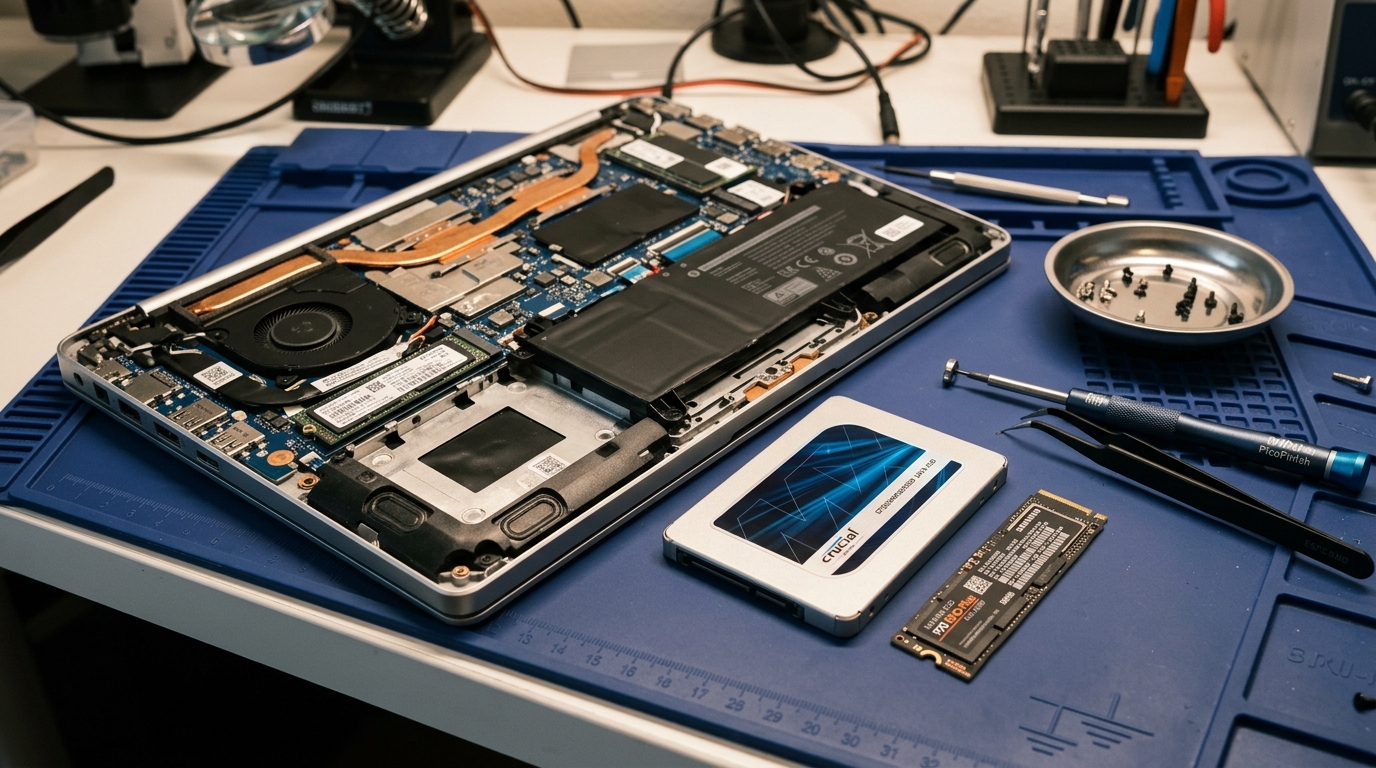 Authentic hardware diagnostic workbench at Zitek Ahmedabad displaying genuine box-pack 2.5" SATA III, mSATA, and PCIe Gen4 M.2 NVMe solid state drives alongside ESD-safe installation tools and dual-bay hardware cloning docks.
Direct Answer: How Much Does a Laptop SSD Upgrade Cost in Ahmedabad in 2026?
💡 સિનિયર એન્જિનિયર ગાઇડ: અમદાવાદમાં લેપટોપ SSD અપગ્રેડ કરાવવાનો વાસ્તવિક ખર્ચ કેટલો થાય?
અમદાવાદ અને ગાંધીનગરમાં ઓન-સાઇટ ડોરસ્ટેપ ફિટમેન્ટ, લાઇવ હાર્ડવેર ક્લોનિંગ અને સત્તાવાર કંપની વૉરંટી સાથે અસલ SSD અપગ્રેડનો ખર્ચ ક્ષમતા અને ટેકનોલોજી મુજબ ₹૯૯૯ થી ₹૧૮,૫૦૦ સુધી થાય છે:
- 128GB SSD (SATA III / mSATA - Crucial, Consistent, Kingston): ₹૯૯૯ – ₹૧,૨૯૯ (બિલિંગ પીસી અને જૂના લેપટોપ્સમાં વિન્ડોઝ બૂટ ડ્રાઇવ માટે બેસ્ટ)
- 256GB SSD (SATA III / M.2 NVMe - Crucial BX500, WD Green, Kingston): ₹૧,૪૯૯ – ₹૧,૯૯૯ (અમદાવાદમાં સૌથી વધુ વેચાતી બજેટ SSD, બૂટ ટાઇમ ઘટીને ૧૨ સેકન્ડ)
- 512GB SSD (M.2 NVMe PCIe Gen3/Gen4 - Crucial P3, WD Blue SN580, Samsung): ₹૨,૮૫૦ – ₹૩,૮૫૦ (પ્રોફેશનલ્સ, વિદ્યાર્થીઓ અને ઓફિસ કામ માટે આદર્શ સ્ટોરેજ)
- 1TB SSD (અલ્ટ્રા-ફાસ્ટ PCIe Gen4 NVMe - WD Blue SN580, Crucial P3 Plus): ₹૫,૨૦૦ – ₹૭,૨૦૦ (ડેવલપર્સ, 4K વિડીયો એડિટર્સ અને આર્કિટેક્ચર સોફ્ટવેર માટે)
- 2TB SSD (એક્સ્ટ્રીમ વર્કસ્ટેશન NVMe - Samsung 990 Pro, WD Black SN850X): ₹૧૧,૫૦૦ – ₹૧૮,૫૦૦ (હાઈ-એન્ડ ગેમિંગ રિગ્સ અને હેવી 3D પ્રોજેક્ટ્સ માટે)
Semiconductor Market Volatility & Daily Spot Rate Terms (ભાવ વધઘટ અંગેની શરતો)
📌 સેમિકન્ડક્ટર માર્કેટ અને SSD કિંમત વધઘટ અંગેની વ્યવહારુ સ્પષ્ટતા
સોલિડ સ્ટેટ ડ્રાઇવ (SSD) માં વપરાતી 3D NAND Flash મેમરી અને કંટ્રોલર ચિપ્સના વૈશ્વિક ભાવો આંતરરાષ્ટ્રીય સેમિકન્ડક્ટર સ્પોટ માર્કેટ, AI ડેટા સેન્ટર્સની જંગી ડિમાન્ડ અને યુએસ ડોલર સામે રૂપિયાના વિનિમય દર (USD/INR) મુજબ સતત બદલાતા રહે છે:
- દૈનિક સ્પોટ રેટ મુજબ ભાવો: આ આર્ટિકલમાં દર્શાવેલા ભાવો માર્કેટની સામાન્ય સ્થિતિ દર્શાવે છે. આજના ચોક્કસ લાઇવ સ્પોટ રેટ, બ્રાન્ડ ઉપલબ્ધતા (Crucial, Samsung, Western Digital) અને ડોરસ્ટેપ ફિટમેન્ટ ચાર્જ જાણવા માટે ઓર્ડર કન્ફર્મ કરતાં પહેલાં Zitek એન્જિનિયર સાથે ફોન કે વોટ્સએપ પર પુષ્ટિ કરવી જરૂરી છે.
- સત્તાવાર ૩ થી ૫ વર્ષની વૉરંટી: કોઈપણ ડ્રાઇવ પર "લાઇફટાઇમ વૉરંટી" હોતી નથી. તમામ જેન્યુઇન ડ્રાઇવ્સ સત્તાવાર ૩ વર્ષથી ૫ વર્ષની બ્રાન્ડ રિપ્લેસમેન્ટ વૉરંટી ધરાવે છે જે અધિકૃત સર્વિસ સેન્ટર પરથી માન્ય રહે છે.
- ૧૦૦% પાકું GST બિલિંગ: તમામ કિંમતોમાં કાયદેસર પાકું GST ઇન્વોઇસ સામેલ હોય છે જેથી ભવિષ્યમાં કોઈપણ ઓથોરાઇઝ્ડ સર્વિસ સેન્ટર પર વૉરંટી મેળવવામાં સરળતા રહે.
The Mechanical Spindle Crisis: Why 5400 RPM Hard Drives Cripple Windows 10 & Windows 11
To understand why your laptop slows down to an unbearable crawl, you must examine the physical mechanics of traditional hard disk drives. A conventional 2.5-inch laptop hard drive contains one or more glass or aluminum platters coated with a magnetic layer, spinning continuously at 5,400 revolutions per minute (RPM). A physical read/write head mounted on a mechanical actuator arm must physically float on a microscopic cushion of air and sweep across the radius of the platter to seek the exact magnetic sectors where files are stored.
This physical mechanism creates severe hardware bottlenecks that modern operating systems simply cannot tolerate:
- Random Access Latency (Seek Time): A 5400 RPM hard drive has an average random seek time of 12 to 18 milliseconds (ms). In stark contrast, a solid-state drive uses solid silicon flash memory cells with no moving parts, delivering an access latency of less than 0.05 milliseconds—over 250 times faster.
- IOPS (Input/Output Operations Per Second): A typical laptop hard drive can process approximately 75 to 100 IOPS. Modern Windows 11 background services (such as Windows Update, Windows Defender real-time scanning, telemetry reporting, and Search Indexer) frequently demand between 800 and 2,500 IOPS simultaneously. When the drive can only process 90 IOPS, the operating system queue backlog overflows, leading directly to the dreaded 100% Disk Usage spike in Task Manager where mouse clicks freeze and apps report "Not Responding".
- Sequential Read/Write Speeds: Mechanical hard drives rarely exceed 80 to 120 MB/s sequential read speeds on outer tracks, dropping to as low as 40 MB/s on inner tracks. A basic SATA SSD easily achieves 550 MB/s, while an M.2 NVMe drive reaches 3,500 to 7,450 MB/s.
- Physical Shock Vulnerability & Bad Sectors: Because laptop computers are frequently moved, picked up while operating, and carried in backpacks across Ahmedabad's roads, mechanical drives suffer from head crashes. If the actuator head makes microscopic contact with the spinning platter, permanent magnetic damage occurs, creating unreadable bad sectors that cause system crashes, infinite boot repair loops, and data loss.
Anatomy of Laptop SSD Interfaces: 2.5" SATA, mSATA, M.2 SATA, and M.2 NVMe
Before purchasing an SSD, it is crucial to accurately identify which internal physical form factor and communication bus interface your laptop motherboard supports. Installing the incorrect physical drive or protocol key will result in either physical incompatibility or the drive failing to be recognized by the motherboard BIOS.
Below is an engineering breakdown of all major solid state disk interfaces encountered in modern and legacy laptops:
| SSD Form Factor & Protocol | Physical Connector / Key Notch | Interface Bus & Theoretical Limit | Peak Real-World Sequential Read/Write | Typical Laptop Compatibility Across Gujarat |
|---|---|---|---|---|
| 2.5-Inch SATA III (7mm) | Standard 7-Pin SATA Data + 15-Pin Power | SATA 3.0 (6.0 Gbps / 600 MB/s) | 550 MB/s Read / 520 MB/s Write | Universal: Dell Inspiron 3521/3542, HP 15-r/g, Lenovo G50, Acer Aspire (2008–2021) |
| mSATA (Mini-SATA) | 52-Pin Mini-PCIe Physical Socket | SATA 3.0 (6.0 Gbps / 600 MB/s) | 540 MB/s Read / 500 MB/s Write | Vintage Ultrabooks: Dell Latitude E7240/E7440, ThinkPad X230, HP EliteBook 9470m |
| M.2 SATA (NGFF B+M Key) | Dual Notch (B-Key + M-Key at Pins 12-19 & 59-66) | SATA 3.0 (6.0 Gbps / 600 MB/s) | 540 MB/s Read / 490 MB/s Write | Transition Models: HP 15-bs, Acer Aspire 5 (6th–8th Gen Core), Asus Vivobook X507 |
| M.2 NVMe PCIe Gen3 x4 | Single Notch (M-Key at Pins 59-66, 5 Pins) | PCIe 3.0 x4 (32.0 Gbps / 4 GB/s) | 3,500 MB/s Read / 3,000 MB/s Write | Mainstream Modern: Dell Latitude 5400, HP Pavilion 15, ThinkPad T490, Ryzen 3000-5000 |
| M.2 NVMe PCIe Gen4 x4 | Single Notch (M-Key at Pins 59-66, 5 Pins) | PCIe 4.0 x4 (64.0 Gbps / 8 GB/s) | 7,450 MB/s Read / 6,900 MB/s Write | High-End & Gaming: Intel 12th–14th Gen, Ryzen 6000–8000, Alienware, ROG, Legion |
| M.2 NVMe PCIe Gen5 x4 | Single Notch (M-Key with Active Heatpipe Sink) | PCIe 5.0 x4 (128.0 Gbps / 16 GB/s) | 12,000+ MB/s Read / 10,000+ MB/s Write | Extreme Workstations & Desktop DTR Laptops (Raptor Lake Refresh, Ryzen 9000) |
1. 2.5-Inch SATA III Solid State Drives
The 2.5-inch SATA SSD is housed in a lightweight 7mm aluminum or reinforced composite enclosure that matches the physical mounting dimensions, screw hole positions, and connector pinouts of standard laptop hard drives. It utilizes the SATA revision 3.0 interface operating at 6.0 Gigabits per second (Gbps). Due to 8b/10b encoding overhead, real-world throughput tops out at approximately 550 to 560 MB/s. Because nearly all legacy laptops manufactured between 2008 and 2020 feature a 2.5-inch drive bay, this SSD offers virtually universal backwards compatibility.
2. mSATA (Mini-SATA) Drives & The "SATA to mSATA" Architecture
Before the standardized M.2 specification was finalized, ultrabook manufacturers designed the mSATA form factor. Physically matching the 52-pin Mini-PCIe expansion card slot, mSATA drives measure approximately 50.8mm by 29.85mm. While electrically adhering to SATA 6Gbps protocol speeds (up to 540 MB/s), they require a dedicated mSATA slot found on corporate workhorses like the Dell Latitude E7240, E7440, Lenovo ThinkPad X230, T430s, and HP EliteBook Folio 9470m.
In situations where customers wish to install an mSATA drive into a standard 2.5-inch bay, our technicians utilize precision SATA to mSATA adapter enclosures, which bridge the pinouts transparently without signal loss.
3. M.2 SATA vs M.2 NVMe: Understanding the Key Notches
A common mistake made by inexperienced computer users is assuming that all gumstick-shaped M.2 drives are identical:
- M.2 SATA (B+M Key): Features two physical cutouts (notches) on the edge connector pinout. The B-key occupies pins 12 to 19, while the M-key occupies pins 59 to 66. It communicates over legacy SATA signal traces at a ceiling of 540 MB/s.
- M.2 NVMe (M-Key): Features only a single notch on the right side at pins 59 to 66 (M-Key). It communicates directly over PCI Express high-speed serial lanes, bypassing the legacy AHCI storage stack. NVMe utilizes up to 64,000 parallel command queues (compared to SATA's single queue of 32 commands), unlocking speeds up to 7,450 MB/s and slashing access latencies.
Silicon Architecture: DRAM Cache vs HMB, TLC vs QLC, and TBW Endurance
Not all solid-state drives deliver the same sustained performance under real-world computing workloads. When evaluating SSD options for your laptop in Ahmedabad, our senior technicians assess three critical hardware parameters:
Below is an engineering comparison of NAND cell structures and controller technologies:
| NAND Flash Architecture | Voltage Levels Per Cell | Bits Per Cell | Native Raw Write Speed | Typical Endurance (TBW per 1TB) | Silicon Lifespan Under Heavy Use | Recommended Engineering Application |
|---|---|---|---|---|---|---|
| SLC (Single-Level Cell) | 2 Voltage States | 1 Bit | 500+ MB/s (Native) | 50,000 to 100,000 TBW | 25+ Years | Enterprise mission-critical caching & military aerospace |
| MLC (Multi-Level Cell) | 4 Voltage States | 2 Bits | 450+ MB/s (Native) | 3,000 to 10,000 TBW | 15+ Years | Industrial workstations & high-write surveillance NVRs |
| 3D TLC (Triple-Level Cell) | 8 Voltage States | 3 Bits | 250 to 350 MB/s | 600 to 1,200 TBW | 10 to 15 Years | Gold Standard: Crucial MX500, WD Blue SN580, Samsung 980 Pro |
| 3D QLC (Quad-Level Cell) | 16 Voltage States | 4 Bits | 60 to 90 MB/s (Direct) | 200 to 400 TBW | 5 to 8 Years | Budget High-Capacity Storage: Crucial P3, Kingston NV2 |
1. Dedicated DRAM Cache vs Host Memory Buffer (HMB)
An SSD stores a lookup table (Flash Translation Layer or FTL map) that translates logical block addresses from the operating system into physical NAND flash memory cell locations.
- DRAM-Equipped SSDs (e.g., Crucial MX500, Samsung 980 Pro, Kingston KC3000): Include a dedicated high-speed DDR3 or DDR4 RAM chip mounted directly on the SSD circuit board. This DRAM chip holds the FTL map for instant nanosecond lookup. Under prolonged sustained writes (such as copying a 100GB database or editing 4K video), DRAM-equipped drives maintain stable, unthrottled write throughput.
- DRAM-Less HMB SSDs (e.g., WD Blue SN580, Crucial P3 Plus): To reduce retail manufacturing costs while preserving top burst speeds, NVMe protocol version 1.2 introduced Host Memory Buffer (HMB). The SSD controller borrows a tiny 64MB slice of your laptop's main system RAM via Direct Memory Access (DMA) over the PCIe bus to cache the lookup map. For standard office multitasking, web browsing, and booting, HMB drives deliver virtually indistinguishable performance from DRAM drives at a significantly more attractive price point.
2. NAND Flash Memory Cell Types: TLC versus QLC
Solid-state storage stores electrical charge across microscopic floating-gate or charge-trap NAND transistors:
- TLC (Triple-Level Cell, 3 bits per cell): Stores 8 distinct voltage states per cell. TLC offers superior endurance, faster native programming write speeds, and robust resilience under heavy thermal cycles. All premium drives (Samsung 980 Pro, WD Blue SN580, Crucial T500) utilize 3D TLC NAND.
- QLC (Quad-Level Cell, 4 bits per cell): Stores 16 distinct voltage states per cell. While QLC increases storage density (enabling affordable 1TB and 2TB drives like Crucial P3), once the high-speed pseudo-SLC write buffer is exhausted during massive file transfers, raw write speeds can temporarily degrade to mechanical HDD levels (60–80 MB/s). For typical everyday computing, QLC is exceptionally reliable, but for continuous write-heavy workstations, our engineers firmly recommend TLC NAND.
3. TBW (Terabytes Written) Endurance Ratings
Manufacturers measure SSD operational longevity in Terabytes Written (TBW). A quality 500GB TLC NVMe drive typically features an endurance rating of 300 TBW. To exhaust this lifespan over a 5-year period, a user would need to write over 164 Gigabytes of new data every single day without interruption. For everyday business and student use in Ahmedabad, the physical NAND cells will easily operate reliably for 8 to 12 years.
Comprehensive 2026 Laptop SSD Upgrade Price Matrix in Ahmedabad & Gandhinagar
Below is the genuine, technician-verified price matrix for laptop solid-state drives across Ahmedabad. These prices reflect authentic original tier-1 brand products, professional doorstep installation, internal fan servicing, and official manufacturer warranty coverage.
| SSD Model & Capacity Code | Form Factor & Bus Interface | Sequential Read Speed | Sequential Write Speed | Authentic Price Range (Ahmedabad) | Manufacturer Replacement Warranty | Recommended Workload & Target Laptops |
|---|---|---|---|---|---|---|
| 128GB SSD (Consistent / Frontech) | 2.5" SATA III / mSATA | 500 MB/s | 450 MB/s | ₹999 – ₹1,299 | 3 Years Replacement | POS Billing Machines, Core 2 Duo legacy laptops, basic GST billing |
| 240GB / 256GB SSD (Crucial BX500) | 2.5" SATA III (7mm Bay) | 540 MB/s | 500 MB/s | ₹1,499 – ₹1,850 | 3 Years Official | Dell Inspiron 3521/3542, HP 15-r, Lenovo G50, everyday office use |
| 250GB / 256GB SSD (WD Green / Kingston NV2) | M.2 NVMe PCIe Gen3 x4 | 2,400 MB/s | 1,800 MB/s | ₹1,650 – ₹1,999 | 3 Years Official | Budget M.2 laptops, ultra-fast Windows 11 boot drive paired with HDD |
| 480GB / 512GB SSD (Crucial BX500) | 2.5" SATA III (7mm Bay) | 540 MB/s | 500 MB/s | ₹2,650 – ₹3,250 | 3 Years Official | Legacy laptop complete HDD replacement without secondary optical caddy |
| 500GB / 512GB SSD (WD Blue SN580 NVMe) | M.2 2280 PCIe Gen4 x4 | 4,000 MB/s | 3,600 MB/s | ₹2,950 – ₹3,850 | 5 Years Official | Dell Latitude 5400/5410, HP Pavilion, ThinkPad T-series corporate laptops |
| 500GB / 512GB SSD (Crucial P3 Plus NVMe) | M.2 2280 PCIe Gen4 x4 | 4,700 MB/s | 1,900 MB/s | ₹2,850 – ₹3,650 | 5 Years Official | College engineering students, software programming, heavy multitasking |
| 1TB SSD (WD Blue SN580 NVMe Gen4) | M.2 2280 PCIe Gen4 x4 | 4,150 MB/s | 4,150 MB/s | ₹5,200 – ₹6,800 | 5 Years Official | Full-stack developers, AutoCAD, Premiere Pro, heavy local storage |
| 1TB SSD (Crucial P3 Plus NVMe Gen4) | M.2 2280 PCIe Gen4 x4 | 5,000 MB/s | 4,200 MB/s | ₹5,400 – ₹7,200 | 5 Years Official | High-demand sweet-spot capacity for corporate mobile workstations |
| 1TB SSD (Samsung 980 Pro / 990 Pro) | M.2 2280 PCIe Gen4 x4 | 7,450 MB/s | 6,900 MB/s | ₹6,800 – ₹8,200 | 5 Years Official | Flagship creator rigs, high-FPS gaming laptops, heavy local compiling |
| 2TB SSD (Crucial P3 Plus / Kingston NV2) | M.2 2280 PCIe Gen4 x4 | 5,000 MB/s | 4,200 MB/s | ₹11,500 – ₹14,500 | 5 Years Official | Massive video archives, local Docker/VM labs, virtual machines |
| 2TB SSD (Samsung 990 Pro Flagship) | M.2 2280 PCIe Gen4 x4 | 7,450 MB/s | 6,900 MB/s | ₹15,500 – ₹18,500 | 5 Years Official | Extreme gaming workstations (Alienware m18, ROG Strix, Legion Pro 7) |
Motherboard Chipset & Processor Generation Compatibility Matrix
To ensure complete transparency before you book a service, our engineering team has mapped laptop processor generations to their corresponding internal SSD capabilities:
| Processor Generation & Platform | Chipset Families | Native Bus Capabilities | Supported SSD Interface Options | Engineering Notes & Firmware Guidelines |
|---|---|---|---|---|
| Intel 2nd & 3rd Gen Core (Sandy/Ivy Bridge) | HM65, HM70, HM76, HM77 | SATA 3.0 (6Gbps) on Port 0 | 2.5" SATA III SSD Only | No native NVMe boot driver in BIOS. Maximum speed ~550 MB/s. |
| Intel 4th & 5th Gen Core (Haswell/Broadwell) | Lynx Point, Wildcat Point | SATA 3.0 (6Gbps) + mSATA | 2.5" SATA III or mSATA SSD | Dell Latitude E7440, ThinkPad T440s have dedicated mSATA slots. |
| Intel 6th & 7th Gen Core (Skylake/Kaby Lake) | Sunrise Point, Union Point | SATA 3.0 + Early M.2 (PCIe x2) | 2.5" SATA III or M.2 (SATA/NVMe) | ~40% of early M.2 slots only accept M.2 SATA. Verified on-site. |
| Intel 8th to 11th Gen Core (Coffee/Tiger Lake) | Cannon Point, Tiger Lake PCH | PCIe Gen3 x4 Direct NVMe | M.2 NVMe PCIe Gen3 x4 (Up to 3,500 MB/s) | Native UEFI NVMe boot driver embedded in BIOS. Slashes boot to 8s. |
| Intel 12th to 14th Gen Core (Alder/Raptor) | Alder Lake, Raptor Lake PCH | PCIe Gen4 x4 Direct NVMe | M.2 NVMe PCIe Gen4 x4 (Up to 7,450 MB/s) | Requires Intel VMD storage driver during Windows 11 installation. |
| AMD A-Series & E-Series APUs (A4, A6, A9) | Integrated AMD FCH Hub | SATA 3.0 (6Gbps) Controller | 2.5" SATA III SSD Only | Massive revival: Transforms notoriously slow laptops into smooth PCs. |
| AMD Ryzen 2000 & 3000 Mobile (Picasso/Dali) | Promontory Mobile FCH | PCIe Gen3 x4 NVMe + SATA III | M.2 NVMe PCIe Gen3 or 2.5" SATA | Dual-drive ready: NVMe SSD for Windows + 1TB HDD for storage. |
| AMD Ryzen 5000 to 8000 Mobile (Zen 3/4) | AMD Phoenix / Hawk Point | PCIe Gen4 x4 Direct Bus | M.2 NVMe PCIe Gen4 x4 (Up to 7,450 MB/s) | Extreme multi-core storage throughput for CAD and 4K video editing. |
The Dual-Drive Strategy: Optical Bay HDD Caddy Conversion
Does your laptop have an integrated DVD-RW optical drive that you haven't opened in years? Rather than discarding your original 1TB mechanical hard drive, our technician can implement a high-efficiency Dual-Drive Architecture:
| Laptop Hardware Slot | Installed Storage Drive | File System Role & Purpose | Real-World Performance Benefits |
|---|---|---|---|
| Primary Motherboard SATA Bay | 256GB or 512GB Solid State Drive (SSD) | Windows 11 OS, C:\ Drive, Software Programs, Tally Prime | 550 MB/s to 3,500 MB/s, 12-second boot, instantaneous app launches |
| Optical Bay (Converted via 9.5mm Caddy) | Original 1TB Mechanical Hard Disk (HDD) | Secondary D:\ Drive, Video Archives, Media, Backups | Expansive 1000GB bulk storage at zero extra drive replacement cost |
How the Optical Caddy Conversion Is Performed On-Site
- Chassis Measurement: We extract the optical drive and measure the chassis profile thickness (either 9.5mm ultra-slim or 12.7mm standard).
- Transferring the Aesthetic Faceplate: Our technician carefully unclips the exterior plastic bezel from your original DVD drive and snaps it onto the edge of the aluminum caddy. Your laptop retains its flawless original factory appearance with zero gaps or protruding edges.
- Optimized Bus Assignment: The high-speed SSD is mounted in the primary motherboard SATA bay to ensure maximum SATA III 6Gbps transfer speeds. The original mechanical hard drive is seated securely in the optical caddy, serving as an expansive secondary drive (D:) for large archives, video files, and backups.
Crucial BIOS, Firmware & Controller Configurations for Laptop SSDs
Simply snapping an SSD into an M.2 socket or SATA port does not guarantee peak performance. Motherboard firmware must be properly calibrated to unlock full storage throughput:
1. AHCI Mode vs RAID On / Intel VMD
Older SATA laptops frequently default to legacy IDE mode in BIOS. Solid-state drives require AHCI (Advanced Host Controller Interface) to activate Native Command Queuing (NCQ) and the essential TRIM command. If AHCI is not active, drive performance degrades by up to 40%.
On modern 11th to 14th Gen Intel laptops, Dell and HP frequently ship systems with Intel VMD (Volume Management Device) or Intel RST RAID enabled in BIOS. If you attempt a clean Windows installation on a new NVMe drive without pre-loading the Intel Rapid Storage Technology VMD driver via USB, the Windows installer will report: "We couldn't find any drives." Our engineers carry specialized pre-loaded VMD F6 storage drivers to ensure smooth hardware discovery.
2. UEFI Native Boot vs Legacy CSM
Modern SSDs should always be formatted under the GPT (GUID Partition Table) partitioning scheme running under pure UEFI (Unified Extensible Firmware Interface) boot mode. Legacy MBR (Master Boot Record) partitions limit drive addressing to 2.2TB and fail to support modern Windows Fast Startup and Secure Boot features.
3. Thermal Throttling & Thermal Pads
High-speed PCIe Gen4 NVMe SSDs (operating above 5,000 MB/s) consume between 4 and 7 Watts of power under sustained read/write bursts. Without adequate heat dissipation, the onboard controller chip can quickly reach 75°C to 80°C, triggering aggressive thermal throttling that cuts transfer speeds by more than half. During doorstep installation, Zitek technicians install high-conductivity silicone thermal pads (6.0 W/mK) that bridge the SSD controller to your laptop's internal aluminum sub-chassis or copper shielding, ensuring continuous, cool operation.
Important Data Liability & Backup Policy (ડેટા જવાબદારી બાબતે સ્પષ્ટતા)
🛡️ ગ્રાહક ડેટા સુરક્ષા અને બેકઅપ અંગેની નીતિ (કાયદેસર સ્પષ્ટતા)
ડેટા બેકઅપની ૧૦૦% સંપૂર્ણ જવાબદારી ગ્રાહકની પોતાની રહેશે:
લેપટોપમાં SSD અપગ્રેડ, હાર્ડવેર ફિટમેન્ટ, ડેટા ક્લોનિંગ કે વિન્ડોઝ ઇન્સ્ટોલેશન કરાવતાં પહેલાં પોતાના અંગત, વ્યાપારી કે કોન્ફિડેન્શિયલ ડેટાનો બેકઅપ લેવાની સંપૂર્ણ જવાબદારી ગ્રાહકની પોતાની છે. અગાઉથી જૂની હાર્ડ ડ્રાઇવમાં રહેલા બેડ સેક્ટર્સ (Bad Sectors), પ્લેટર ડેમેજ, રીડ/રાઈટ હેડ ક્રેશ, ફાઈલ સિસ્ટમ કરપ્શન કે અનપેક્ષિત હાર્ડવેર ફેલ્યોરના કારણે થતા કોઈપણ પ્રકારના ડેટા લોસ (Data Loss) માટે Zitek, તેના સંચાલકો કે ફિલ્ડ ટેકનિશિયનની કોઈ કાયદેસર, આર્થિક કે નૈતિક જવાબદારી રહેશે નહીં.
10 Real-World SSD Upgrade Diagnostic & Troubleshooting Scenarios
During thousands of doorstep laptop repairs across Ahmedabad, our senior technicians frequently resolve complex hardware and firmware anomalies:
Scenario 1: SSD Not Detected in BIOS Setup
- Diagnostic Cause: On older laptops, an M.2 SATA SSD is inserted into an NVMe-only M.2 slot, or an NVMe drive is seated in an early M.2 slot wired solely for SATA signals. On 2.5-inch SATA bays, the flexible ribbon cable may have loose ZIF clip connections.
- Technical Resolution: We inspect motherboard schematics to confirm bus routing. If the M.2 slot is SATA-only, we swap to a compatible B+M key SATA drive. For ribbon connectors, we inspect pin continuity and reseat using anti-static tape.
Scenario 2: Windows 11 Installer Shows "No Drives Found"
- Diagnostic Cause: Intel 11th–14th Gen platforms utilize Intel Volume Management Device (VMD) architecture. The standard Microsoft Windows installation ISO lacks built-in VMD controller INF drivers.
- Technical Resolution: Our technician enters BIOS, temporarily disables Intel VMD Controller (switching to AHCI mode), or loads the official Intel RST VMD controller driver via USB flash drive during the Windows setup storage selection screen.
Scenario 3: Blue Screen of Death (BSOD) "INACCESSIBLE_BOOT_DEVICE" (0x0000007B) After Cloning
- Diagnostic Cause: The original Windows installation was configured with IDE or RAID storage drivers, while the new SSD is operating in native AHCI mode.
- Technical Resolution: We boot Windows into Safe Mode (
bcdedit /set {current} safeboot minimal), which forces Windows to load the native AHCI storage driver on startup, then disable Safe Mode (bcdedit /deletevalue {current} safeboot) and reboot normally into desktop.
Scenario 4: Extreme System Freezing at 99% During Drive Cloning
- Diagnostic Cause: The source mechanical hard drive has uncorrectable I/O errors and physical bad sectors in the Master File Table (MFT) or pagefile sectors.
- Technical Resolution: Standard software cloning utilities freeze when encountering unreadable sectors. We connect the drive to a standalone hardware duplicator that uses algorithmic bad-sector skipping, or perform a specialized clean Windows 11 installation and manually migrate undamaged user data folders.
Scenario 5: Cloned SSD Shows Original Hard Drive Capacity (Unallocated Space Lost)
- Diagnostic Cause: When cloning a 500GB HDD to a 1TB SSD, the partition layout mirrors the original 500GB geometry, leaving the remaining 500GB as unallocated space. Furthermore, a manufacturer recovery partition situated between the C: drive and unallocated space blocks native partition expansion.
- Technical Resolution: Using non-destructive partition management software, we relocate the hidden recovery partition to the extreme end of the drive and extend the primary C: partition to consume 100% of the available 1TB capacity.
Scenario 6: Slow SSD Speeds (Under 250 MB/s on a 550 MB/s SATA SSD)
- Diagnostic Cause: The motherboard SATA controller is operating in legacy SATA II (3.0 Gbps) mode rather than SATA III (6.0 Gbps), or the partition is misaligned on 512-byte boundaries instead of 4K sector clusters.
- Technical Resolution: We verify 4K sector alignment by checking
msinfo32-> Storage -> Disks -> "Partition Starting Offset". If the offset is not evenly divisible by 4096, we perform non-destructive 4K sector realigning to restore full 550 MB/s throughput.
Scenario 7: Windows Boots from Old HDD Even After Installing New SSD in Caddy
- Diagnostic Cause: The motherboard BIOS boot priority table lists the optical drive bay ahead of the primary SATA bay, or both drives contain identical Windows Boot Manager signatures, causing UEFI collision.
- Technical Resolution: We format the bootloader partition on the secondary HDD using
diskpart, ensure the new SSD is placed at the top of the UEFI boot order, and assign the secondary drive strictly as a storage volume (D: drive).
Scenario 8: Laptop Randomly Reboots or Crashes Under Heavy Load
- Diagnostic Cause: High-performance PCIe Gen4 NVMe drive overheating due to lack of chassis thermal coupling, triggering thermal emergency shutdown.
- Technical Resolution: We install an ultra-slim copper heatsink with 6.0 W/mK phase-change thermal interface material that bridges the SSD controller to the laptop's lower magnesium/aluminum chassis.
Scenario 9: BitLocker Recovery Key Prompt Upon First Boot with Cloned SSD
- Diagnostic Cause: Motherboard TPM (Trusted Platform Module) 2.0 detects a hardware platform configuration change (new disk serial number and bus ID) and halts boot to protect encrypted volume data.
- Technical Resolution: Prior to hardware extraction, our technicians assist the customer in locating their 48-digit Microsoft BitLocker recovery key or temporarily suspending BitLocker protection (
Suspend-BitLocker -MountPoint "C:" -RebootCount 0) during the hardware transition.
Scenario 10: "No Bootable Device Found" After Installing M.2 SSD in Legacy BIOS
- Diagnostic Cause: Motherboard BIOS is running in legacy CSM mode, but the new SSD was partitioned as a GPT volume without an active MBR partition.
- Technical Resolution: We update the laptop BIOS to the latest manufacturer firmware revision to unlock native UEFI boot support, or convert the partition layout to MBR using
mbr2gpt.exe /allowFullOS.
Zitek's 30-Minute Doorstep SSD Upgrade Workflow in Ahmedabad
We understand that working professionals, business owners, and students cannot afford to leave their laptops at a repair shop for 3 to 5 days. Below is our standardized 4-stage doorstep engineering workflow executed live at your home or office:
| Workflow Stage | Time Allocation | Technical Actions Performed On-Site | Customer Verification & Safety Protocols |
|---|---|---|---|
| Stage 1: On-Site Telemetry Audit | 0 to 10 Minutes | Physical chassis disassembly, SMART bad sector audit, motherboard bus verification (SATA, mSATA, NVMe Gen3/Gen4) | Customer observes real-time disk health and confirmed compatibility quote |
| Stage 2: Live 1-to-1 Hardware Cloning | 10 to 25 Minutes | Source HDD & target SSD connected to standalone hardware duplicator; bitwise sector copy executed | 100% preservation of Windows activation, Tally data, and desktop folders without format |
| Stage 3: Anti-Static Fitment & Servicing | 25 to 35 Minutes | SSD installed on grounded ESD safety mat; high-conductivity 6.0 W/mK thermal pad applied | Internal cooling fan and heatpipe fins cleared of dust to prevent thermal throttling |
| Stage 4: Boot Verification & Handover | 35 to 45 Minutes | System powered on; verified 12-second clean boot demonstrated; TRIM and 4K alignment verified | Official GST tax invoice handed over with 3 to 5 Years Manufacturer Replacement Warranty |
Exhaustive Frequently Asked Questions (FAQs)
Q1: Will upgrading to an SSD delete my genuine Windows 10/11 license or personal data?
Answer: No. When our technician performs a 1-to-1 bitwise hardware clone, your original Windows digital license (which is bound to your motherboard's UEFI ACPI MSDM table) remains 100% active. All your desktop files, installed software (MS Office, AutoCAD, Tally Prime, Photoshop), browser bookmarks, and stored passwords transfer over exactly as they were. However, as per our strict company policy, customers must maintain a personal backup of essential data prior to service initiation.
Q2: What is the price difference between a 256GB SSD and a 512GB SSD in Ahmedabad?
Answer: In Ahmedabad, the price difference between a 256GB SSD (approx. ₹1,499 – ₹1,999) and a 512GB SSD (approx. ₹2,850 – ₹3,850) is typically only ₹1,300 to ₹1,800. For this modest price delta, you receive double the storage capacity, higher write endurance (TBW), and faster sustained transfer speeds, making 512GB the most recommended upgrade for long-term reliability.
Q3: My laptop is 8 years old with an Intel Core i3 3rd Gen processor. Is it worth upgrading to an SSD?
Answer: Absolutely. Older laptops with 3rd to 6th Gen Intel Core processors are bottlenecked almost exclusively by their slow 5400 RPM mechanical drives. Installing a 256GB or 512GB SATA III SSD revitalizes these machines, cutting boot times from over 3 minutes down to 15 seconds and enabling smooth web browsing, YouTube streaming, MS Office productivity, and Zoom meetings without system freezing.
Q4: Which SSD brands does Zitek recommend and install?
Answer: We install exclusively genuine, tier-1 factory box-pack drives from globally recognized semiconductor manufacturers: Crucial by Micron, Western Digital (WD Green, WD Blue, WD Black), Samsung Electronics (980, 980 Pro, 990 Pro), Kingston Technology, and Consistent. We never use grey-market, refurbished, or unbranded OEM pull drives.
Q5: How long does the doorstep SSD upgrade take at my home or office?
Answer: A standard doorstep upgrade typically takes between 30 and 45 minutes from arrival to final boot verification. This includes physical disassembly, drive cloning, internal fan cleaning, SSD installation, thermal pad placement, and post-install speed benchmarking.
Q6: Can I keep my old mechanical hard drive and use it as a backup drive?
Answer: Yes! We offer two convenient solutions: we can install your old 1TB HDD inside an optical bay HDD Caddy (if your laptop has a DVD drive slot), or we can house your old drive inside a high-speed USB 3.0 external hard drive enclosure (for ₹450 – ₹650), converting it into a portable plug-and-play external backup drive for photos and movies.
Q7: What warranty coverage do you provide on newly installed SSDs?
Answer: All solid-state drives supplied by Zitek carry an official 3 to 5 Years Manufacturer Replacement Warranty. If the drive experiences hardware degradation or controller failure within the warranty window, it is eligible for direct one-to-one replacement through authorized brand service centers across Ahmedabad.
Q8: What areas in Ahmedabad and Gandhinagar does Zitek cover for doorstep service?
Answer: Our mobile hardware technicians provide same-day doorstep service across all major localities in Ahmedabad and Gandhinagar, including Satellite, Vastrapur, Bodakdev, SG Highway, Prahlad Nagar, Navrangpura, Naranpura, Paldi, Maninagar, Chandkheda, Motera, Bopal, South Bopal, Gota, Thaltej, Infocity Gandhinagar, and Kudasan.
Q9: Why is my laptop still showing 100% disk usage after installing an SSD?
Answer: A healthy SSD will never display 100% disk usage during standard operation. If 100% disk usage occurs on an SSD, it typically points to severe partition misalignment, corrupted Windows system files, outdated Intel RST drivers, or malicious background crypto-mining software. Our technicians perform a full operating system health audit to eliminate these software anomalies.
Q10: How do I book an on-site SSD upgrade with Zitek in Ahmedabad?
Answer: You can book an appointment instantly by calling our engineering hotline directly at +91 9054975943 or sending a WhatsApp message with your laptop make and model. Our senior technician will verify your laptop's slot compatibility and arrive at your premises with the appropriate genuine hardware.
Conclusion: Revitalize Your Laptop Today with Ahmedabad's Premier Hardware Specialists
Don't spend ₹45,000 to ₹65,000 on a brand-new laptop when an authentic, professionally fitted Solid State Drive can restore blazing-fast performance to your existing machine for a fraction of the cost. With genuine tier-1 components, transparent market pricing, 3 to 5 years manufacturer replacement warranty, and live 30-minute doorstep service across Ahmedabad and Gandhinagar, Zitek is your trusted hardware partner.
Ready to upgrade your laptop's speed?
- Call our engineering desk: +91 9054975943
- WhatsApp for instant model compatibility quote: Chat on WhatsApp
- Book online: Zitek Doorstep Booking

We are passionate hardware engineers who enjoy crafting engaging and informative repair guides. Apart from writing, you'll find our senior team exploring new tech trends and successfully reviving complex dead motherboards across Ahmedabad. We love discovering innovative concepts and bringing dead electronics back to life.